SMTP export. The Hub's servers, in your email platform.
The Hub creates sending points in the connected platform by itself — a PowerMTA vMTA or pool, a MailerQ address, a gateway proxy — complete with login and password.
An address in warm-up gets an hourly limit along with its sending point, and the Hub compares message counts: how many the platform sent and how many the MTA accepted.
SMTP export hands the settings of the Hub's servers over to your email platform. For the platform to send mail through the Hub's servers, it needs sending points: the server address, port, and SMTP login and password. On this page the Hub creates them in the connected platform by itself — Protosender, Interspire, Mumara or MailWizz. You can hand over a PowerMTA vMTA or a whole pool, a MailerQ address, or a gateway proxy. If an address is still warming up, an hourly limit goes along with the point — how many messages an hour it may send. From then on the platform runs the campaigns, while the Hub makes sure its records match the servers and compares message counts: how many the platform sent and how many the MTA accepted.
No manual credentials
Tick a server and its points, and the Hub creates them in the platform with login and password included. You can set the sender address as just the name before the “@”: the Hub fills in the domain for each point.
The warm-up limit reaches the platform
An address in warm-up gets an hourly limit along with its point: the platform won't send more than the address is ready to take today. After that the limit changes with each warm-up step, and the Hub updates it in the platform by itself — once an hour, no buttons needed.
No duplicates
If you hand over the same point again, the Hub updates its record in the platform instead of creating a second one. The page flags the only real duplicate — a pool together with its own addresses — before anything is sent.
Volume check with a tolerance
The platform counts what it sent, and the MTA counts on its own side. A gap of up to a tenth usually comes from the day boundary, and the Hub doesn't raise an alarm about it; if it's larger, a finding appears with both sides' figures.
Delivery is counted by the Hub's MTA, not the platform
How many messages were delivered and what share got through for each point comes from the Hub's MTA data over 30 days. The platform knows how many messages it sent, but not how many of them arrived.
Careful with campaigns already running
You can remove a point from the Hub only — then the record in the platform keeps working — or from the platform as well. The Hub does the latter only on a direct command: campaigns may be going through that point right now.
Where the sending point and volume data comes from
Sending points come from the servers' working settings: PowerMTA vMTAs and pools, MailerQ inbound addresses, gateway proxies. The state of handed-over points comes from reconciliation with the platform, which runs every night and on demand. How many messages the platform sent, and how many opens and clicks there were, comes from a nightly collection of that data from the platform. Delivery comes from the MTA's summary data over 30 days. The limit comes from active warm-up plans. The platform account's API key is stored on its card, so you don't need to enter it each time you hand points over.
01Summary: what was handed to the platform this week
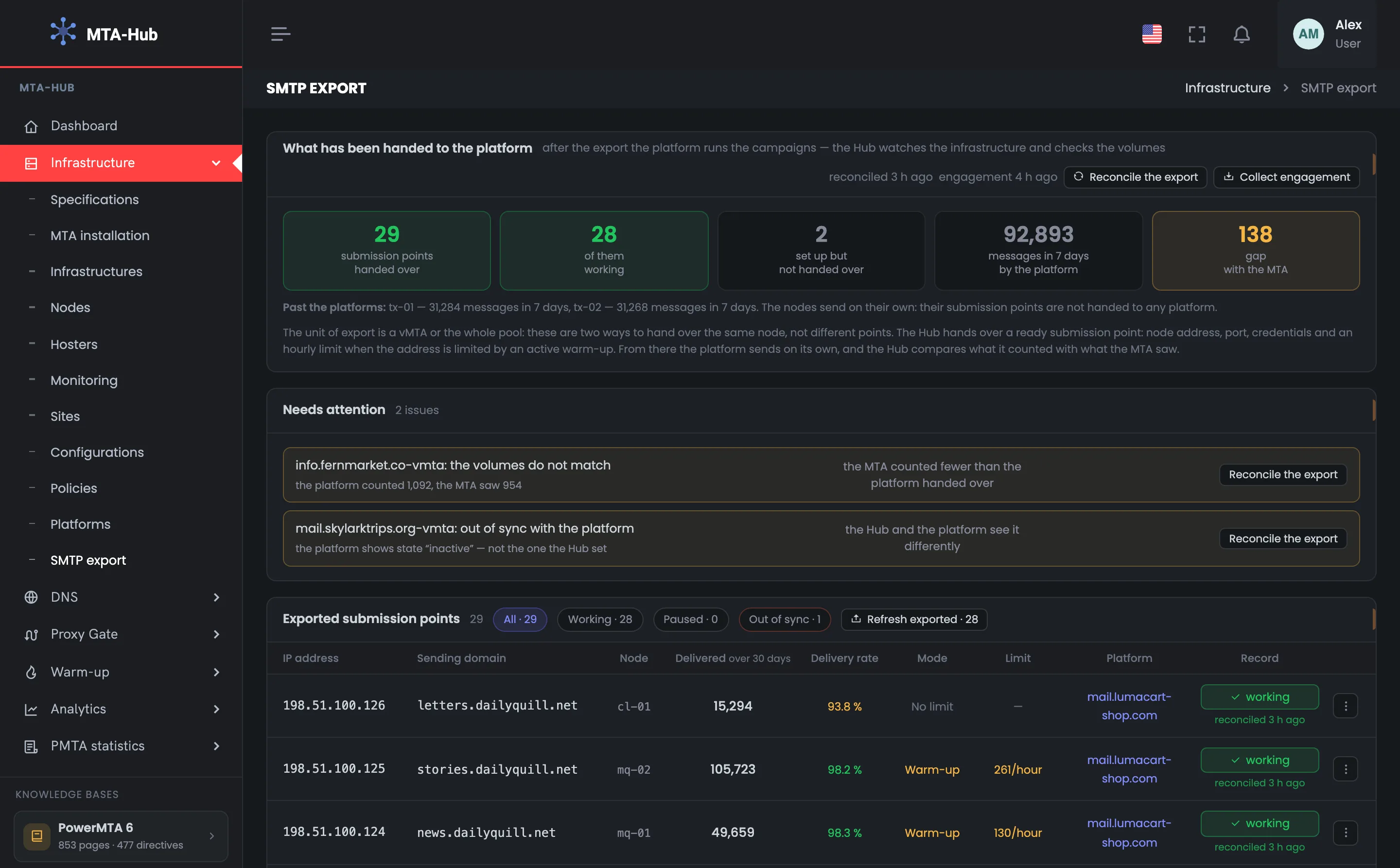
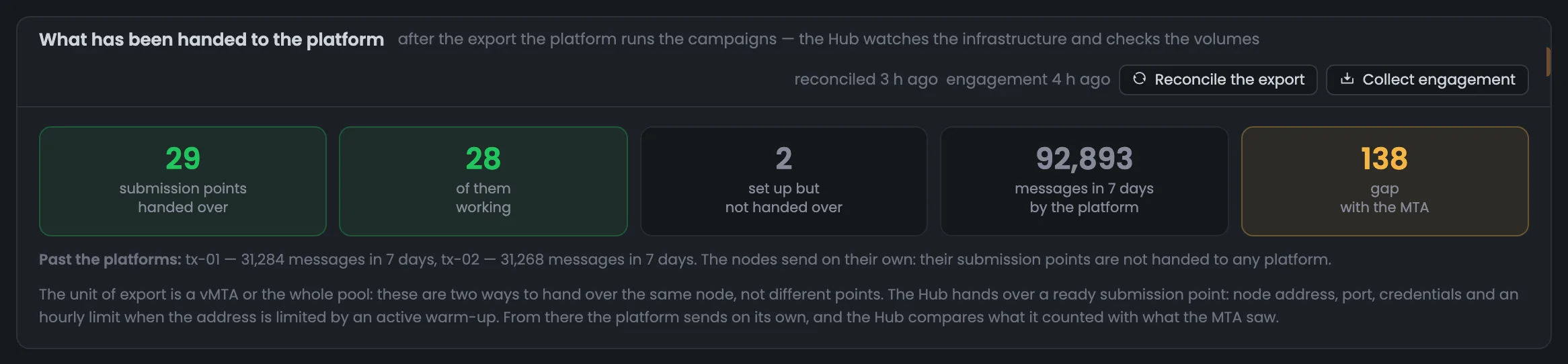
The summary answers the main question: has everything that should send mail been handed to the platform, and does it work? 29 sending points are handed over and 28 of them work; 2 more are set up but not handed over. Over 7 days the platform sent 92,893 messages, and the gap with the MTA is 138 messages — that's one finding from “Needs attention”. The “Past the platforms” note under the tiles shows tx-01 and tx-02: this week they sent 31,284 and 31,268 messages on their own — these are the bank's transactional servers, and that isn't treated as an alarm. At the top are the time of the last reconciliation and two buttons that run it again right now.
02Needs attention: mismatches with the platform
This block is a list of what needs fixing in your sending points: a mismatch in message counts or in the record itself. Each row has the point, the finding with both sides' figures, and a “Reconcile export” button that compares the Hub and the platform again. This is where to start on this page: while there are rows here, the platform and the servers see your sending differently. The example below has two findings: one about volumes, the other about a record's state. Once the cause is fixed, click “Reconcile export” in the row — the block only appears while there is something to report.
The volumes don't match. For info.fernmarket.co-vmta the platform counted 1,092 messages, while the MTA saw 954: a gap of more than a tenth. It's worth checking whether some mail bypasses the Hub's servers and whether messages are being rejected when the server receives them.
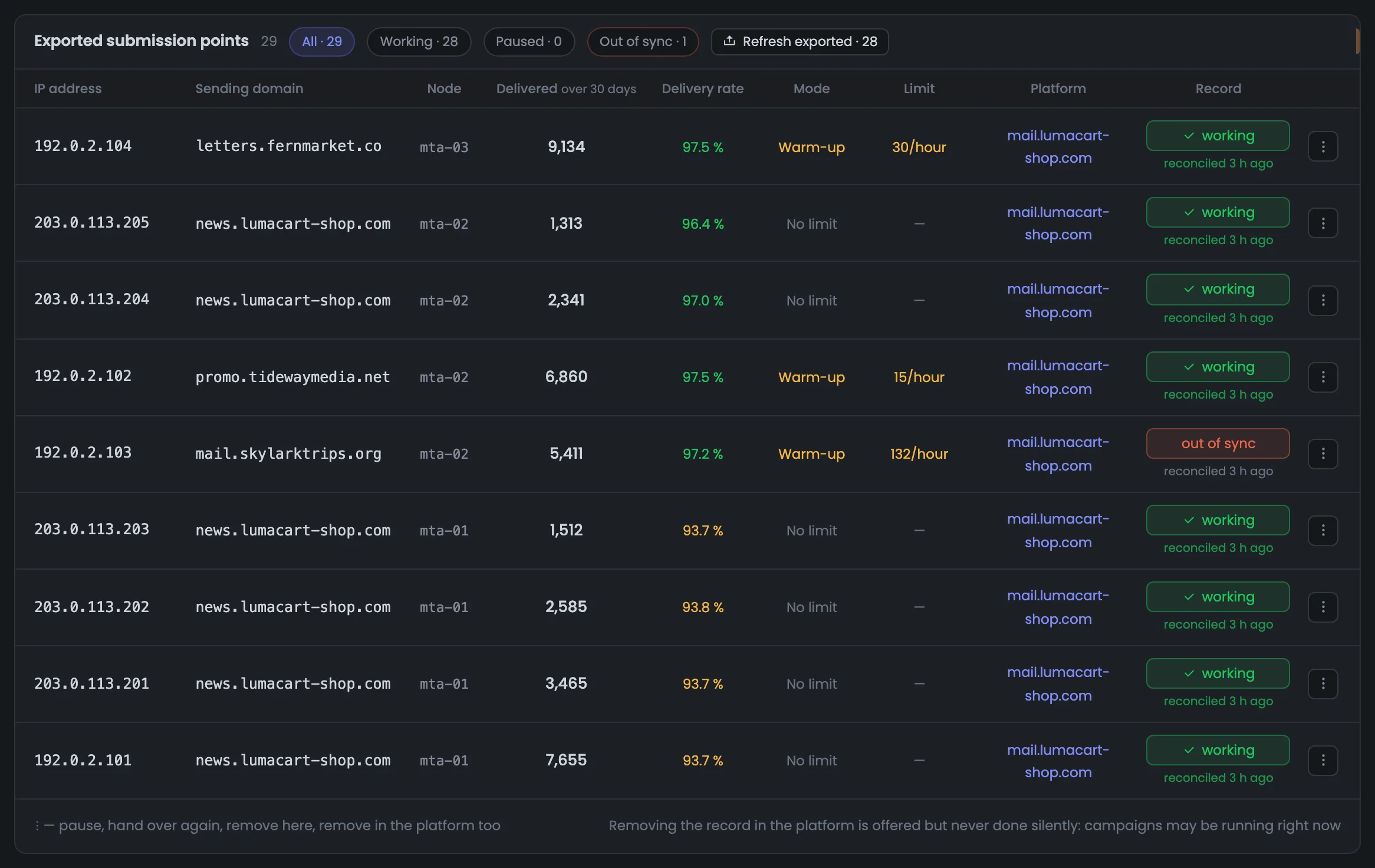
The record is out of sync with the platform. For mail.skylarktrips.org-vmta the platform shows the state “inactive”, not the one the Hub set. Reconciliation flagged the point, and the summary now shows 28 working out of 29.
This block also lists: a server that has nothing handed over and sends nothing itself; a point that has disappeared from its server; a warm-up limit that hasn't reached the platform; a point for which the platform sent no opens and clicks. The block appears only when there is something to report.
03Handed-over sending points: delivery, warm-up, state
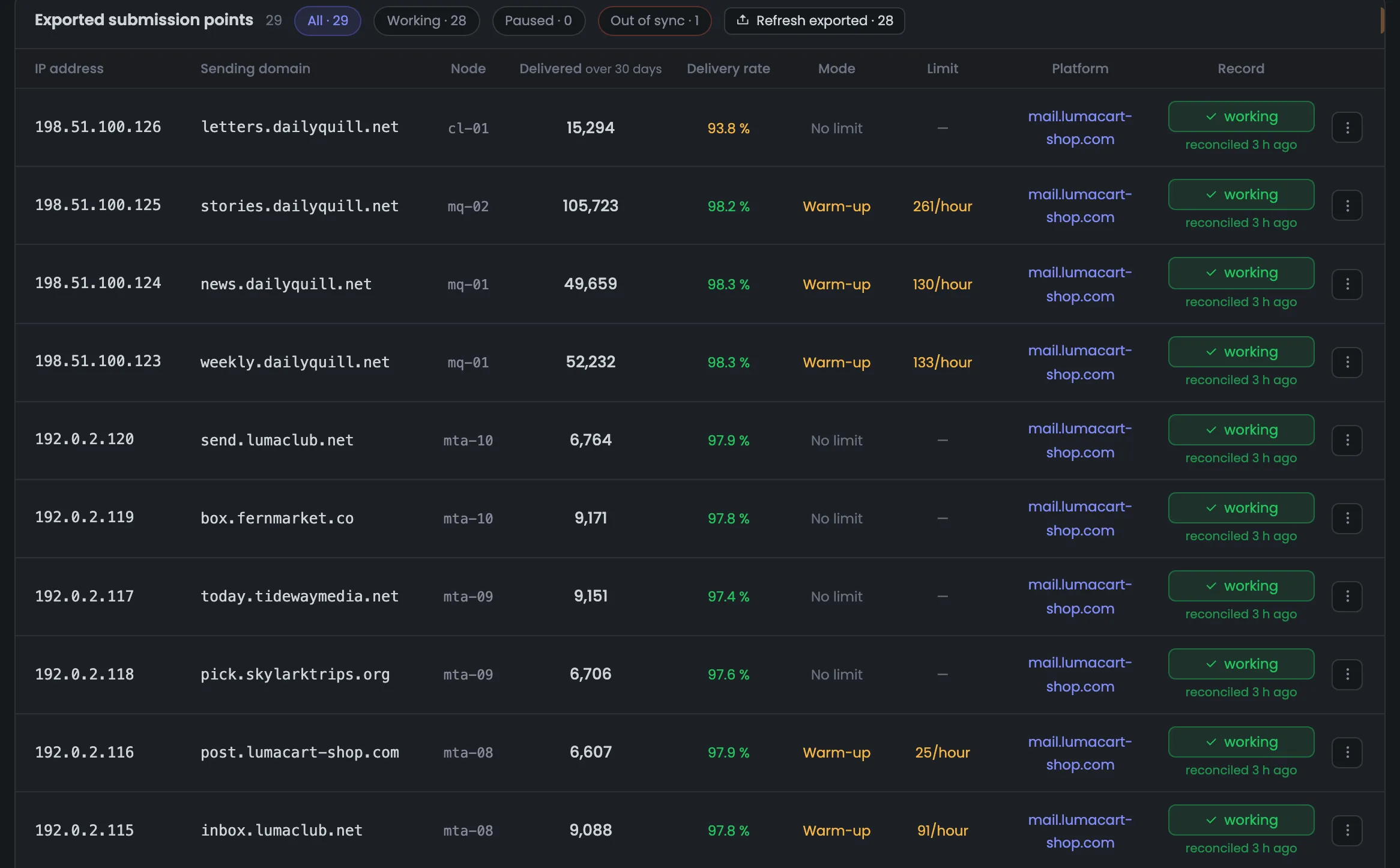
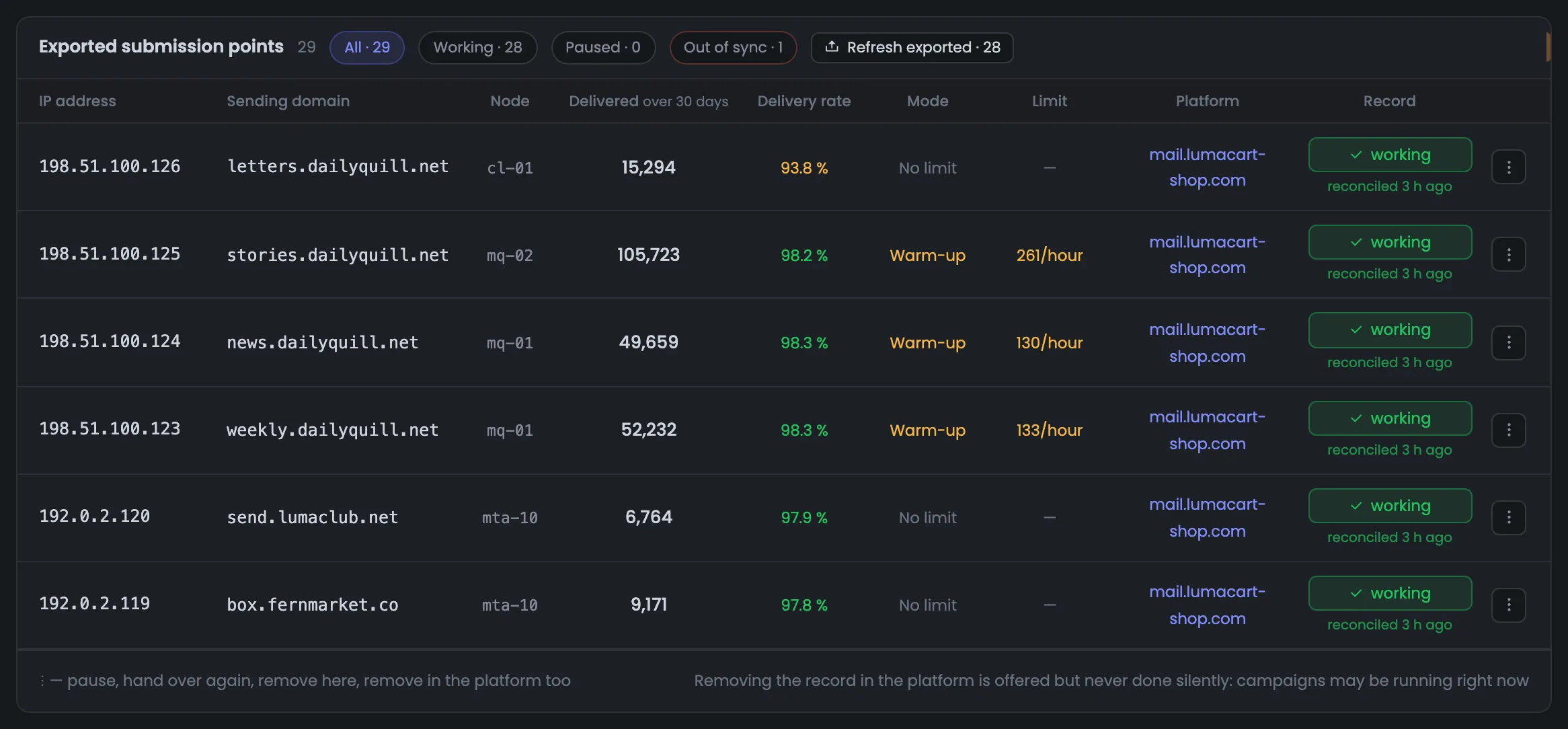
The table shows everything the Hub has handed to the platform: the address and sending domain, the server, how many messages were delivered over 30 days and what share got through, the mode, the limit, the platform and the record's state. At the top are a state filter and the “Refresh exported · 28” button: it hands over all working points again at once, server by server. Here you see MailerQ addresses on mq-01 and mq-02 in warm-up — with limits of 261, 130 and 133 messages an hour — and points with no limit: their addresses aren't warming up right now (the mta-10 plan is paused). The delivery share is colored by the same thresholds as in monitoring: green from 95%, yellow from 85%, red below that.
04Gateway proxies and points in warm-up
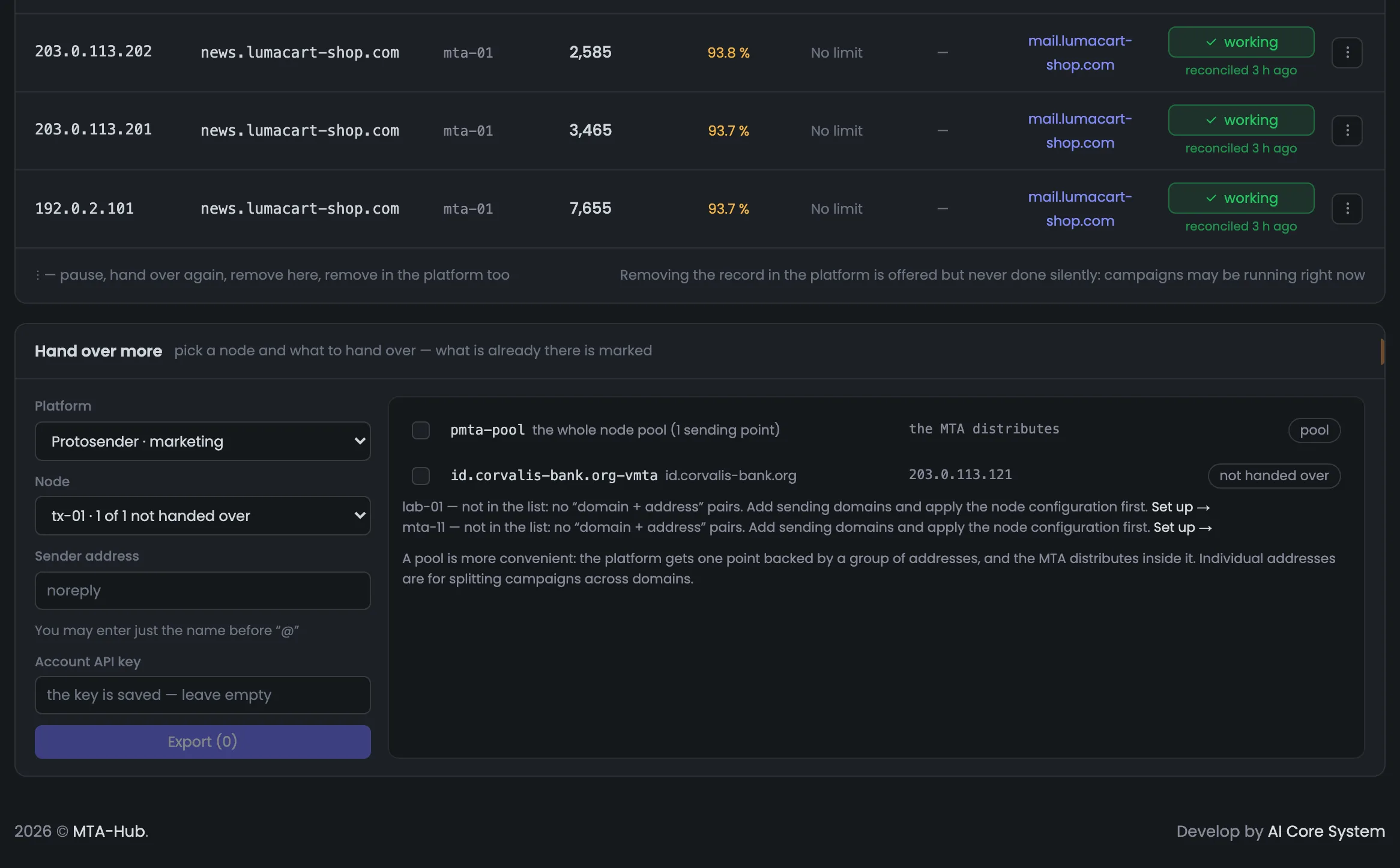
The end of the same table: here you see how proxies and addresses in warm-up reach the platform. The gateway proxies on mta-01 and mta-02 are handed over as separate points: the address in the row is the proxy's external address, and the domain is the one the mail is sent on behalf of. Next to them are mta-02 addresses in warm-up with limits of 15 and 132 messages an hour. mail.skylarktrips.org is marked “out of sync”: such a record has no switch — simply turning back on something that has drifted from the platform wouldn't fix anything. A point like this is reconciled first, with the “Reconcile export” button in the “Needs attention” block.
05Sending point actions: pause, hand over again, remove
The three-dot button opens the row menu, and every point has four actions. “Pause” switches it off in the platform too — the Hub asks first. “Hand over again” updates the record in the platform: the sender domain, the limit, the credentials. “Remove on our side only” — the Hub stops watching the point, and the record in the platform keeps working. “Remove in the platform too” also switches it off there; the Hub asks first, because campaigns through it will stop going out. If you're not sure whether a campaign is running right now, choose “Remove on our side only”. The hint under the table says the same: the Hub suggests removing the record in the platform, but doesn't do it by itself.
06Hand over more: new SMTP points for the platform
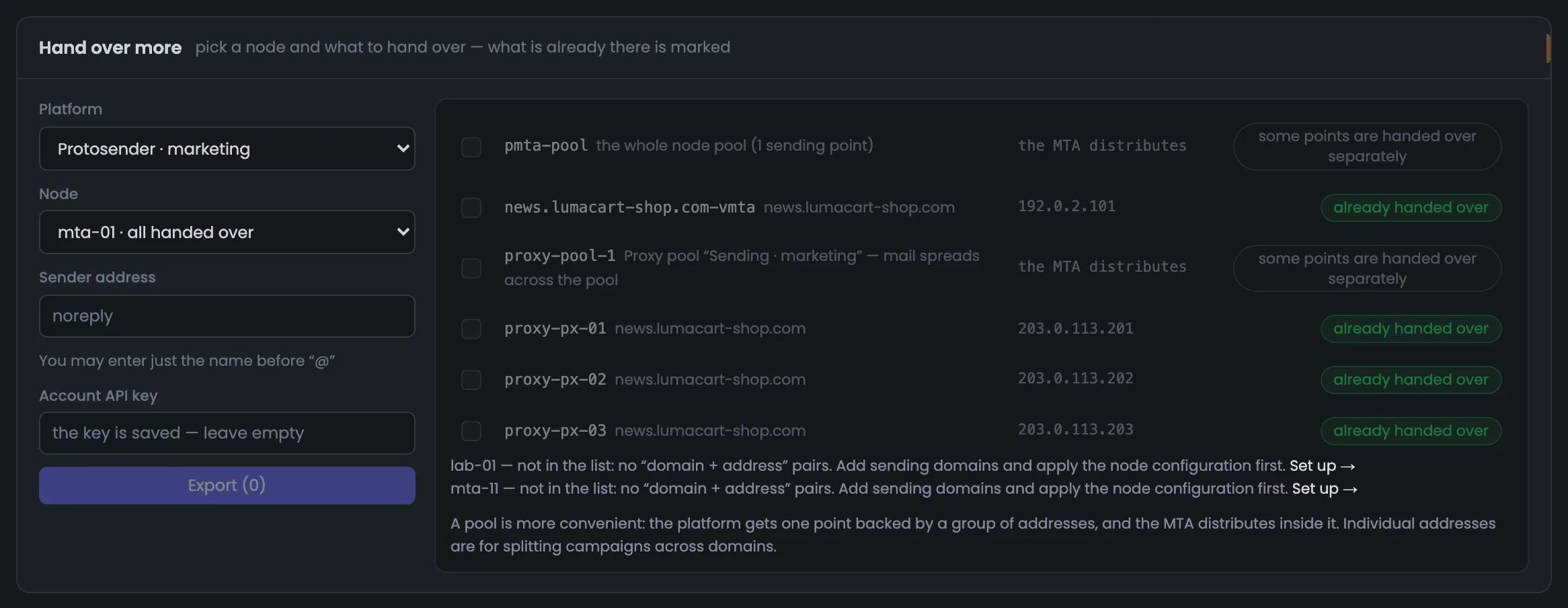
The form for handing over new points: on the left are the platform, the server, the sender address and the platform account's API key — a saved key fills in by itself. If you leave the sender address empty, a new point gets noreply@ at its domain, while a point already handed over keeps its current one. On the right is everything the server can hand over: for mta-01 that's the server pool, its vMTA, a proxy pool and three proxies. What's already handed over is marked “already handed over”; you can pick any row, and handing it over again updates the record. Servers with nothing to hand over are listed with the reason: lab-01 and mta-11 don't have any “domain + address” pairs yet, and the link takes you to their setup.
All modules — in one panel
Dashboard, Proxy Gate, warm-up and accounting statistics are parts of one panel, not separate programs. What each edition includes is on the “Pricing” page.