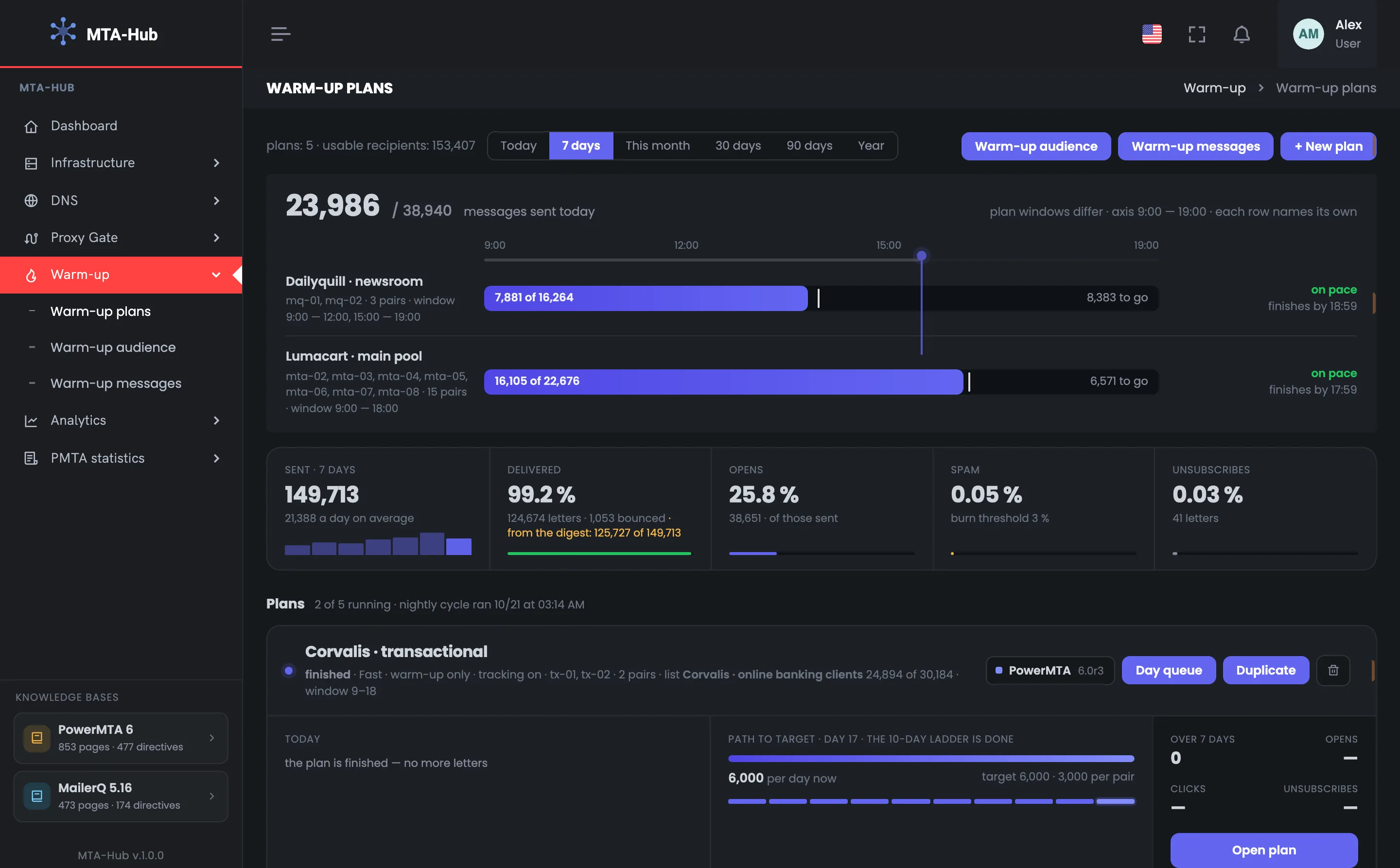
You cannot send a large mailing from a new address right away. Every day the Hub sends a little more mail from a “domain + address” pair to real recipients and watches how it was received.
Overnight the Hub decides: raise the volume, keep it as it is, or roll back a step. A plan is created as a draft and started with a separate button.
Mailbox providers do not know a new IP address and meet a large volume from it with rejections and the “Spam” folder. That is why warm-up goes gradually: every day the Hub sends a little more mail from a “domain + address” pair to real recipients. Overnight it looks at how the providers received the mail and decides whether to raise the limit, hold it or roll back a step.
Nightly cycle
01 · DayEmails by step
02 · NightProvider summary
03 · DecisionGrow, hold or roll back
04 · MorningNew limit
Accepted well — the limit grows; a provider is holding mail back — it stays the same; most are rejected — roll back a step
Hold
Gmail held mail back
On October 17 the Hub did not raise the limit for the Lumacart main pool: the day before, Gmail deferred more than 15% of the emails. On the plan’s chart this day is yellow.
GGmail
deferred
Night of Oct 17Hold
limit does not growover 15% deferred
Rollback
One step back
On October 14, Gmail and Outlook both started deferring more than 40% of the Dailyquill newsroom’s emails, and the Hub rolled the pairs back one step. On the chart this day is red.
HMTA-Hub
decision
Night of Oct 14Roll back a step
Gmail and Outlookover 40% deferred
02 / Today’s sending
The daily warm-up limit on one bar.
The “Today” bar shows how many emails of the warm-up plan’s daily limit have gone out, how many are left and whether the plan will finish before its sending hours end. The tick on the bar is where the plan should be now, so you see at once whether it is falling behind.
Two plans from the exampleData from the screenshots
Today
Window 9–18
16,105 of 22,676 emails sent, 6,571 in the queue. The plan is on pace and will finish by 17:59 — with the last email in its queue.
HMTA-Hub
queue
Today16,105 of 22,676
on pacefinishes by 17:59
Path to target
Days 10–20 of 22
15 pairs on seven PowerMTA servers, each on its own day: pairs were added as addresses were bought. Now 22,676 emails a day against a target of 75,000.
15Pairs
step
Per day now22,676
target 75,0005,000 per pair
Today
Windows 9–12 and 15–19
7,881 of 16,264 emails sent, 8,383 in the queue. Two sending windows a day; the plan is on pace and will finish by 18:59.
HMTA-Hub
queue
Today7,881 of 16,264
on pacefinishes by 18:59
Path to target
12-day ladder
Fast pace, three pairs on MailerQ. One pair has already reached the target — 8,000 emails a day — so the pairs are on different days.
3Pairs
step
Per day now16,264
target 24,0008,000 per pair
Spam is counted the same way everywhere: the share of emails rejected as spam is calculated one way both in the overall summary and for each mailbox provider. Over 7 days — 0.05% against a stop threshold of 3%.
03 / Warm-up plan status
Running, paused and draft warm-up plans.
Every warm-up plan says plainly what state it is in. A draft sends nothing, a paused plan says “paused”, and a finished one says there are no more emails. An empty bar never pretends to be a day that simply has not started yet.
Running · main pool
Running
The day’s bar, the next batch, the path to the target and a two-week chart: ramp-up, hold, rollback.
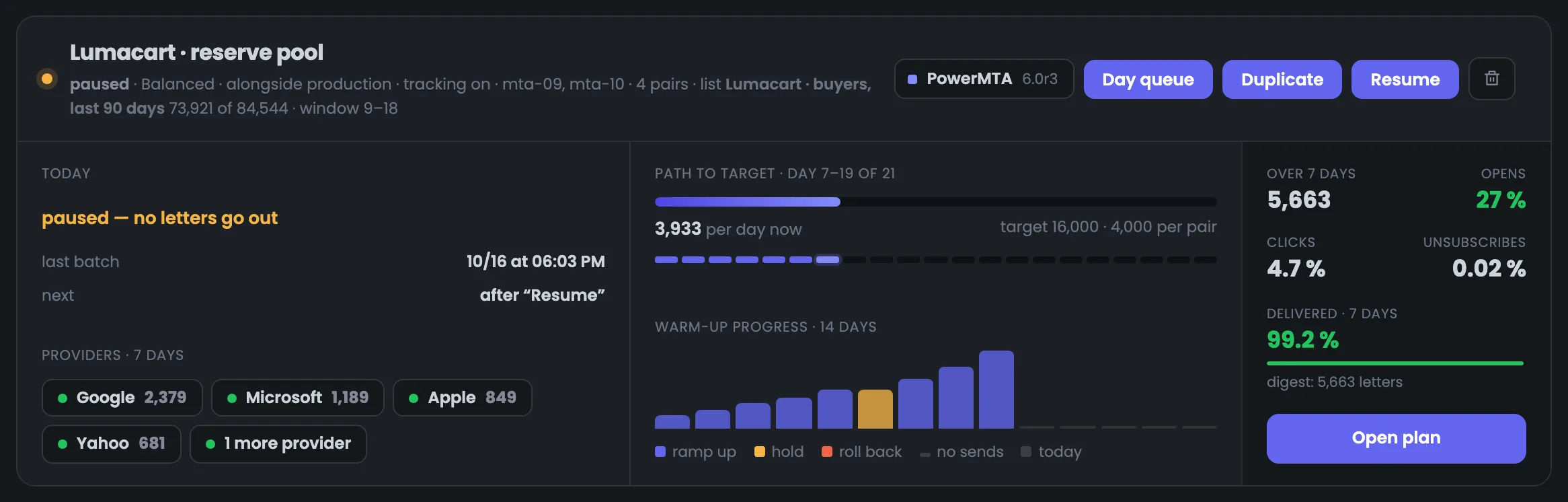
Paused since October 17
Paused
No emails go out; the last ones went on Oct 16 at 18:03, the next ones — after “Resume”. The pairs’ limit is kept.
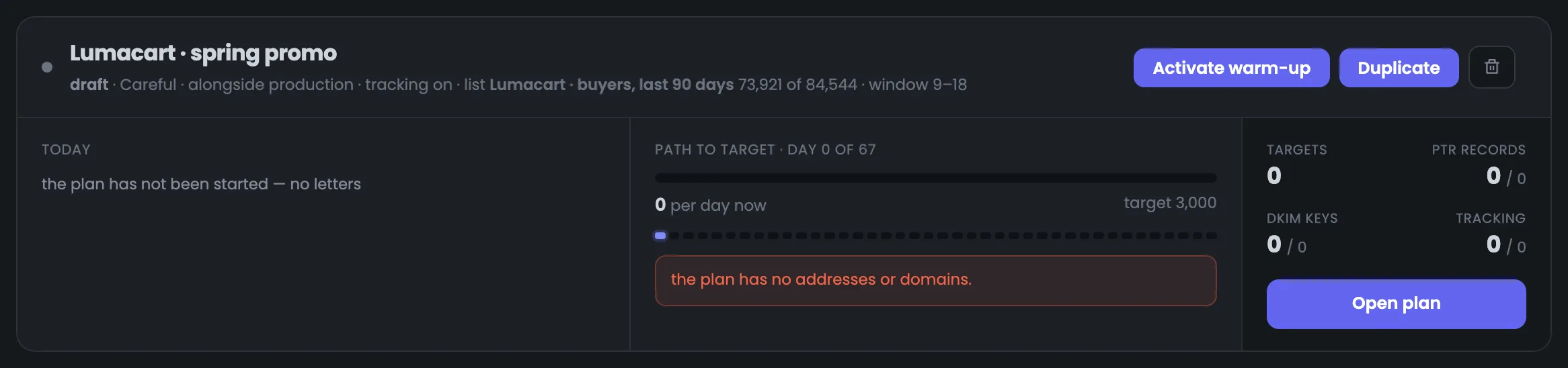
Draft · spring promo
Sends nothing
There are no pairs yet, and the card says so. The readiness check is empty and does not light up green.
A break of up to a week costs nothing, but if no emails go out for seven days or longer, the Hub rolls the pairs back by a third of the way they have come. After a pause the chart shows “not sent” marks, not a red rollback: a person stopped the sending.
04 / New warm-up plan
A warm-up plan in three steps.
A new warm-up plan is created in three steps: which IP addresses and domains to send from, who to email and how fast. A summary of the result stays in view on the right the whole time. The plan itself is created as a draft and started with a separate button after the checks.
New plan
01 · From“Domain + address” pairs
02 · ToOpt-in lists
03 · PaceCareful · 85 days
04 · DraftStart with a button
Nothing goes out by itself: the plan is started with a separate button once the readiness check has passed
List sized in advance
Once every 3 days
A plan emails one person no more than once every three days. So the form works out right away how many emails a day the list can take: the Corvalis list — no more than 8,298, though the target is 10,000.
LList
once every 3 days
Enough for the target?No more than 8,298
24,894 addressestarget 10,000
Three ready-made paces
Careful
Careful — start with 30 emails, +15% every 2 days, 85 days to 10,000 a day. Balanced gets there in 25 days, fast in 13.
HMTA-Hub
ladder
To 10,000 a day85 days
start 30+15% every 2 days
05 / Interface in detail
The “Warm-up” interface — 11 screens.
Today, the figures, four plans in different states and the three steps of a new plan with the summary. Above each screenshot: why the screen matters. Below it: what it shows.
Today and figures
3 screens
The warm-up plans page starts with what matters today: how many plans there are, how many recipients you can email, whether emails are going out and whether they will all go before the sending hours end. Below are the figures for the chosen period: sent, delivered, opens, spam and unsubscribes. The delivered share is counted from the nightly provider summary, so today’s emails get into it after the next nightly count.
01
Section header
Plans, recipients and period
The “Warm-up” section header is the line above all the plans. It tells you at once how many warm-up plans exist and how many recipients you can email: only engagement groups A and B count, without excluded addresses. Here is also the period switch — from today up to a year; it changes the figures below. On the right — links to the warm-up audience and warm-up messages, and the “+ New plan” button that starts the warm-up of a new IP address. If there are fewer recipients than expected, you can find out why on the “Warm-up audience” page: it shows the tiers and the excluded addresses.
EnlargeScreen 01 · Section header. An example from the MTA-Hub interface.
Plans and recipients — 5 plans and 153,407 recipients — tiers A and B without excluded addresses.
Period — today, 7 days, this month, 30 and 90 days, year.
Warm-up audience and Warm-up messages — links to the section’s subpages.
+ New plan — opens the new plan form.
A tier is the recipient’s engagement group: only people who read your emails go into the warm-up.
02
Today
The whole day on one bar
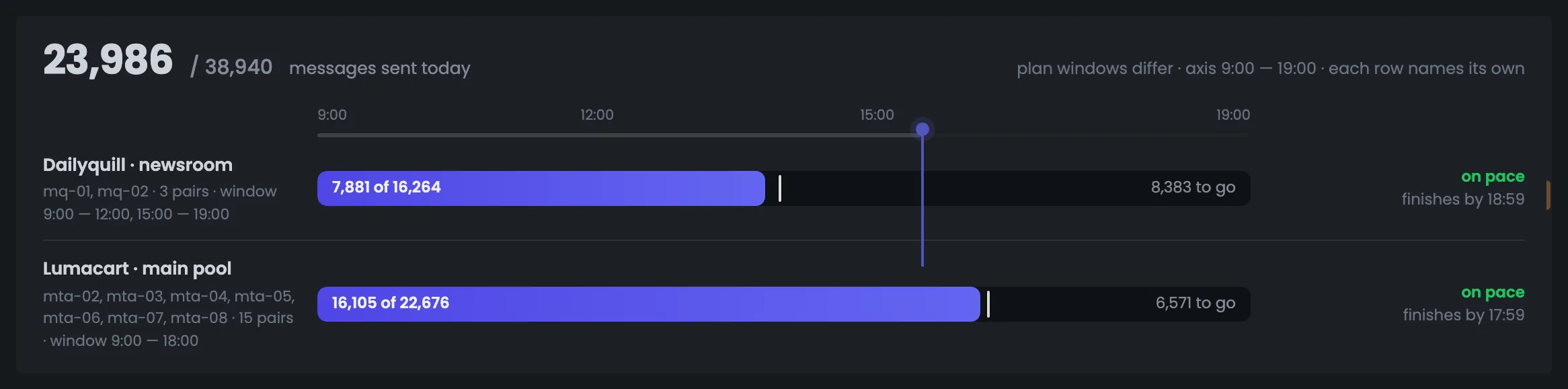
The “Today” bar brings the day of every running warm-up plan into one place. Plans have different sending hours, so the axis runs from the earliest hour to the latest, and each row is labeled with that plan’s hours. The light tick shows where the plan should be now: if the fill reaches it, the plan is on pace and will finish with the last email in its queue. A plan that falls behind is visible at once, with no math — in the example both plans are on time. Look here during the day to make sure emails go out on schedule. If the fill lags behind the tick, open the plan card below and see how many emails are still in the queue.
EnlargeScreen 02 · Today. An example from the MTA-Hub interface.
Total — 23,986 of 38,940 emails sent today.
Dailyquill · newsroom — windows 9–12 and 15–19: 7,881 of 16,264, 8,383 left, finishes by 18:59.
Lumacart · main pool — window 9–18: 16,105 of 22,676, 6,571 left, finishes by 17:59.
On pace — the fill reaches the tick — the plan is not falling behind.
The reserve pool is not here: it is paused and sent nothing today.
03
Figures
Sent, delivered, opens, spam
Five warm-up figures for the chosen period show how mailbox providers accept emails from the addresses being warmed up. The delivered share is counted from the nightly summary, and the block says plainly how many emails are already in the summary: today’s will get there after the nightly count. The key number for decisions is the share of emails rejected as spam: over 7 days it is 0.05% against a stop threshold of 3%, so the warm-up is going smoothly. You switch the period in the section header: 7 days shows the trend, while today’s data is still incomplete. If the spam share gets close to the threshold, look at the plan charts below — which one is rolling back or sitting on “hold”.
EnlargeScreen 03 · Figures. An example from the MTA-Hub interface.
Sent · 7 days — 149,713, an average of 21,388 a day.
Delivered — 99.2% — 124,674 emails, 1,053 bounces; the summary covers 125,727 of 149,713.
Opens — 25.8% of sent.
Spam — 0.05% against a stop threshold of 3%.
Unsubscribes — 0.03% — 41 emails.
The spam share is counted the same way here and for each mailbox provider — it is compared with the threshold at which the warm-up is stopped.
Plans
4 screens
Next come the warm-up plan cards. Four examples show a running plan, a fast pace with a rollback, a paused plan and a draft. For each you see what is happening today, which step of the ladder it is on and how the warm-up went over the last two weeks. The color of the chart bars tells you at once where there was growth, where the Hub held the limit and where it rolled the pairs back.
04
Running plan
Lumacart · main pool
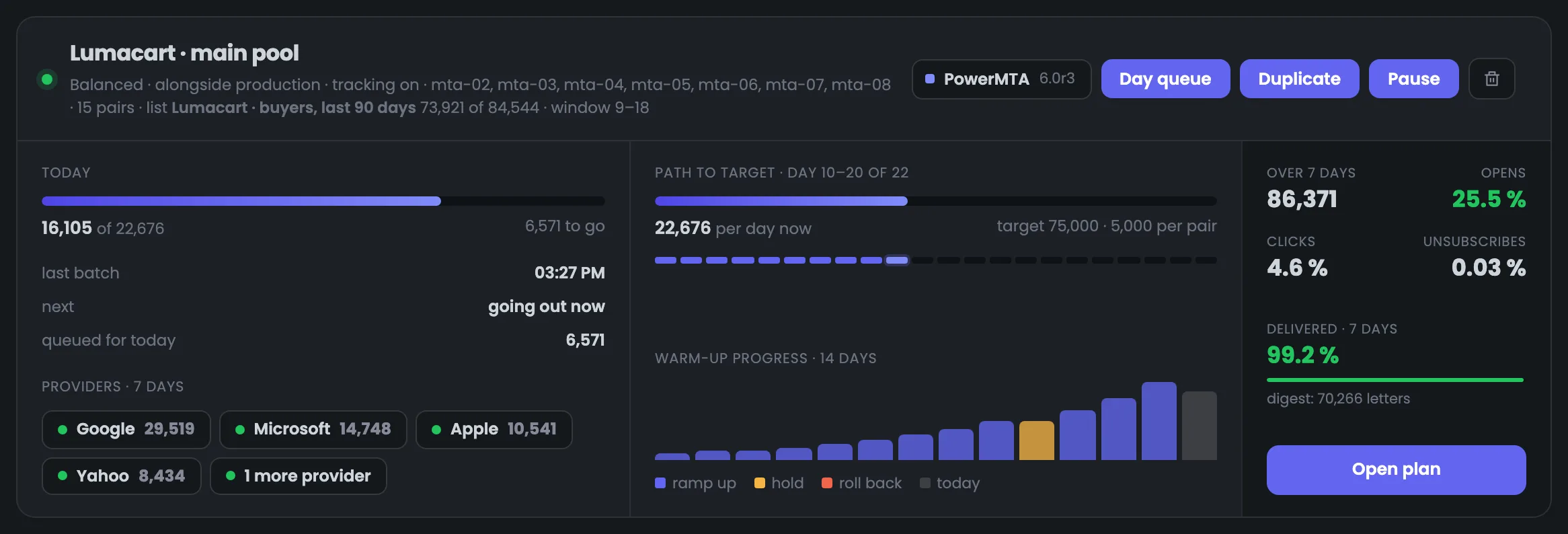
The card of a running warm-up plan — “Lumacart · main pool”: balanced pace, warm-up in parallel with the store’s mailings, 15 pairs on seven PowerMTA servers. Read the card from left to right: today, the path to the target with a two-week chart, and the week’s totals. The chart shows how the warm-up went: days of growth and one yellow “hold” day — October 17, when Gmail deferred more than 15% of the emails and the Hub did not raise the limit. Open the card to see how far the plan still has to go and whether it is stuck. Yellow and red bars are a reason to check which provider was holding mail back; if the chart grows steadily, there is nothing to do.
EnlargeScreen 04 · Running plan. An example from the MTA-Hub interface.
Header — pace, mode, servers, the “buyers, last 90 days” list — 73,921 usable of 84,544, window 9–18.
Day queue, Duplicate, Pause — plan buttons.
Today — 16,105 of 22,676; the next batch is going out now, 6,571 in the queue.
Path to target — days 10–20 of 22; 22,676 a day now, target 75,000 — 5,000 per pair.
Warm-up progress — 14 days: growth and one yellow “hold” day — October 17.
Last 7 days — 86,371 emails, opens 25.5%, clicks 4.6%, delivered 99.2%.
Pairs were added as addresses were bought, so each one is on its own day of the ladder.
05
Fast pace and rollback
Dailyquill · newsroom
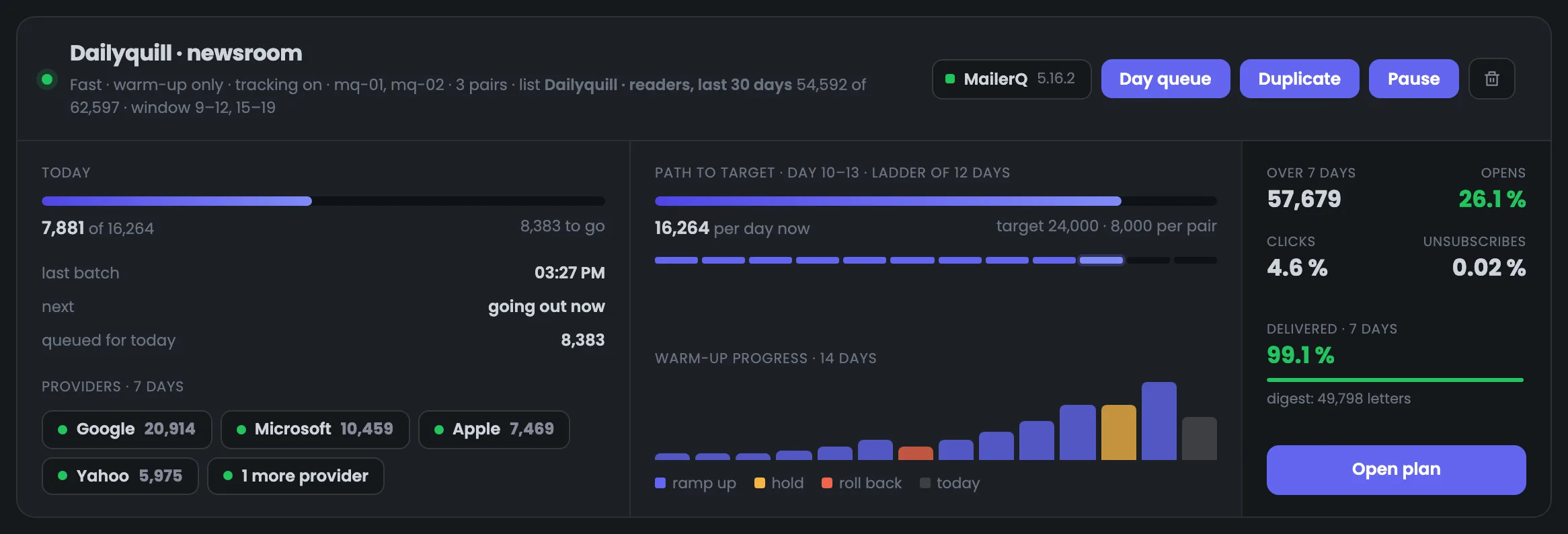
The “Dailyquill · newsroom” card shows a fast warm-up pace on MailerQ: three pairs, warm-up emails only and two sending windows a day. This plan shows how the Hub responds to signals from mailbox providers. When Gmail and Outlook both started deferring more than 40% of the emails, the Hub rolled the pairs back one step — a red bar on the chart. When Gmail held mail back again, the limit stayed the same — a yellow “hold” bar. It is a useful example: a rollback is not a failure but protection of the pair’s reputation. The nightly cycle raises the limit again by itself once providers start accepting mail well — you do not need to do anything by hand.
EnlargeScreen 05 · Fast pace and rollback. An example from the MTA-Hub interface.
Header — fast pace, warm-up only, mq-01 and mq-02, windows 9–12 and 15–19.
Today — 7,881 of 16,264, 8,383 in the queue.
Path to target — 12-day ladder; 16,264 a day, target 24,000 — 8,000 per pair.
Red bar — October 14 — rollback: Gmail and Outlook deferred more than 40% of the emails.
Yellow bar — October 19 — “hold”: the day before, Gmail held mail back again.
Last 7 days — 57,679 emails, opens 26.1%.
One pair has already reached the target — 8,000 emails a day — so the pairs are on different days.
06
Paused plan
Lumacart · reserve pool
The “Lumacart · reserve pool” warm-up plan was paused on the morning of October 17, and the card says so in words: no emails go out, when the last batch went, and that the next one comes after “Resume”. After the pause the chart shows “not sent” marks, not a red rollback: a person stopped the sending, not the Hub. The pairs’ limit is kept, so a short break does not set the warm-up back, and you can resume sending with one button. A pause is handy when you need to sort out a domain or a server without losing the limit you have built up. The main thing is not to drag it out: the time after which the warm-up rolls back is given under the screenshot.
EnlargeScreen 06 · Paused plan. An example from the MTA-Hub interface.
Today — paused — no emails go out.
Last batch — Oct 16 at 18:03.
Next — after the “Resume” button.
Path to target — the limit is kept — 3,933 emails a day, target 16,000.
A break of up to a week costs nothing. If no emails go out for seven days or longer, the Hub rolls the pairs back by a third of the way they have come.
07
Draft
Lumacart · spring promo
A draft warm-up plan, “Lumacart · spring promo”: careful pace and a target of 3,000 emails a day, which will take 67 days to reach. The card says plainly what is missing: the plan has no addresses or domains. The readiness check — reverse DNS, signing keys, tracking — is empty and does not light up green, because there is nothing to check yet. Once pairs are added and everything is ready, you start the plan with the “Activate warm-up” button. It is handy to create a draft in advance, while addresses are being bought and DNS and tracking are being set up: the plan itself sends nothing. When the pairs are ready, the readiness check shows whether everything is set up.
EnlargeScreen 07 · Draft. An example from the MTA-Hub interface.
Today — the plan is not started — no emails.
Path to target — day 0 of 67, target 3,000; a red line — the plan has no addresses or domains.
Activate warm-up — starts the plan once everything is ready.
A draft sends nothing until it is activated.
New plan
4 screens
A new warm-up plan is created in a three-step form: which “domain + address” pairs to send from, who to email and at what pace. A summary stays in view on the right the whole time — what you will get and what is still wrong. The form works out in advance whether the list is enough for the target. The plan itself is created as a draft and sends nothing until it is started.
08
Where we send from
“Domain + address” pairs
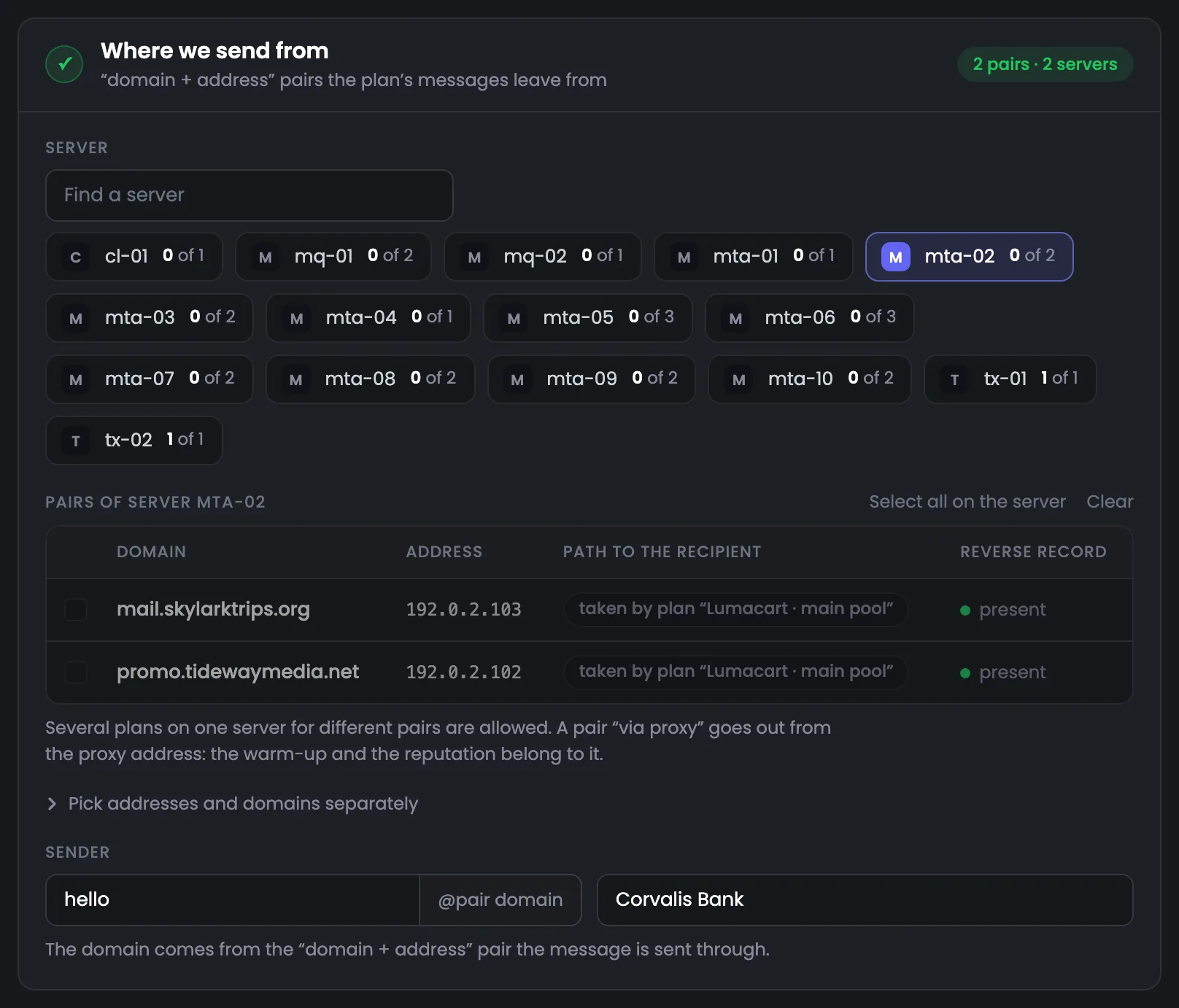
The first step of a new plan is choosing which IP addresses and domains to warm up, that is, the “domain + address” pairs. First you pick a server, then its pairs; each server shows how many of its pairs are already chosen. Pairs taken by another plan cannot be used — the row shows which plan holds them. Next to them you see the address’s reverse DNS and the email’s path: direct or through a proxy. At the bottom you set the sender — the name and the hello@ address on the pair’s domain. Choose pairs that have reverse DNS — you can see it right in the row, and the plan’s readiness check will look at it again later. Taken pairs are freed when their plan finishes: that is how tx-01 and tx-02 became free.
EnlargeScreen 08 · Where we send from. An example from the MTA-Hub interface.
Servers — cl-01, mq-01 … tx-02 and the number of chosen pairs; tx-01 and tx-02 are ticked.
Pairs of server mta-02 — taken by the “Lumacart · main pool” plan — they cannot join a second plan.
Path to recipient and reverse DNS — direct or through a proxy; whether there is reverse DNS.
Sender — hello@ the pair’s domain, name — Corvalis Bank.
A pair that sends “through a proxy” goes out from the proxy’s IP address: the warm-up and the reputation go to the proxy.
09
Who we email
Lists and how much the list can take
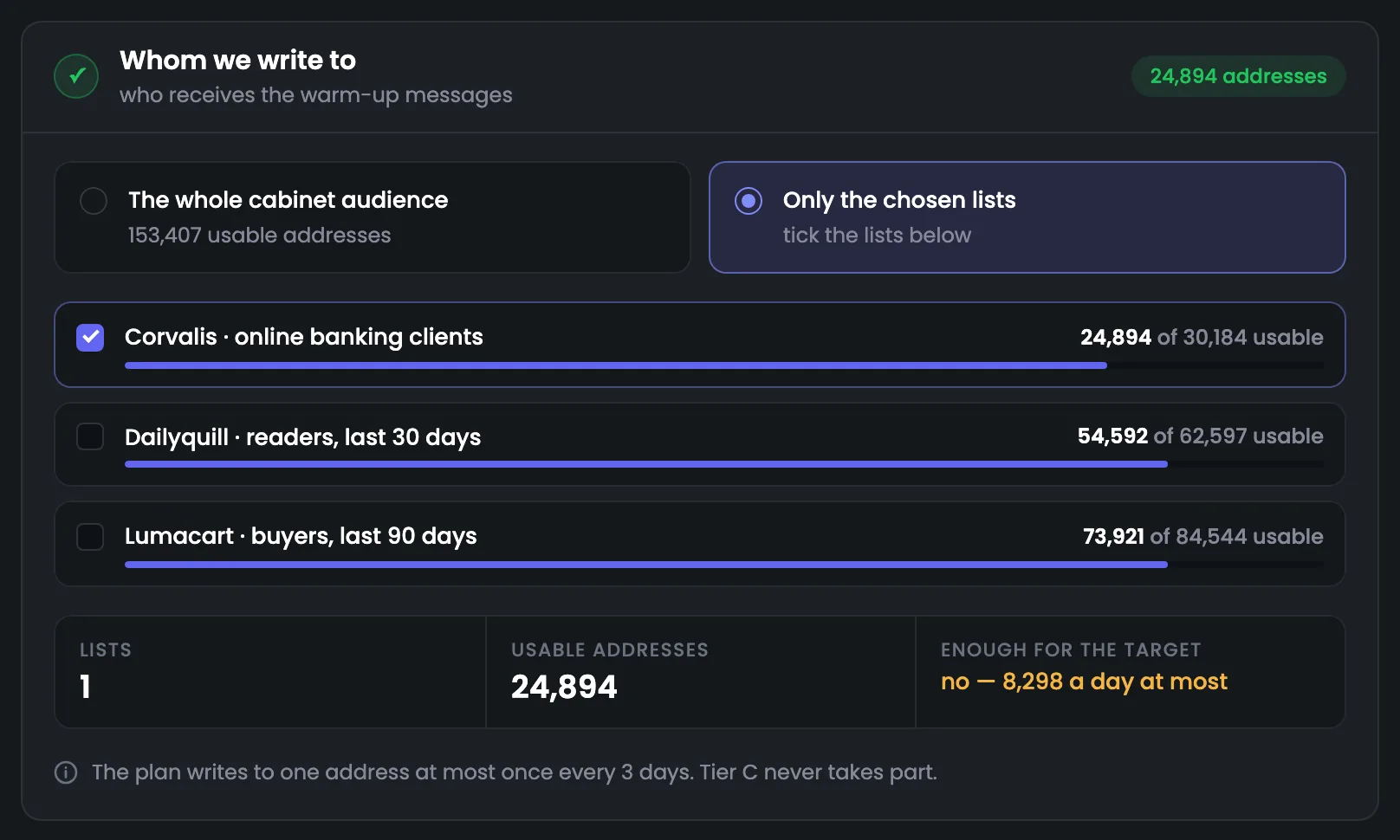
The second step is who gets the warm-up emails: your whole audience in the panel or only chosen lists. Only engaged recipients go into the warm-up, and a plan emails one address no more than once every three days. So the form works out right away how many emails a day the chosen audience can take and warns you if it is not enough for the target. You learn this before the plan starts, not halfway through the warm-up: in the example, the Corvalis list can take no more than 8,298 emails a day against a target of 10,000. If the list is not enough, there are two ways out: lower the target or add lists — you can add to the list on the “Warm-up audience” page.
EnlargeScreen 09 · Who we email. An example from the MTA-Hub interface.
Whole audience — 153,407 usable addresses.
Only chosen lists — “Corvalis · online banking clients” is ticked — 24,894 of 30,184 usable.
Enough for the target? — no — no more than 8,298 emails a day.
A plan emails one address no more than once every 3 days. Tier C and excluded addresses do not go into the warm-up.
10
At what pace
Name, pace, target and mode
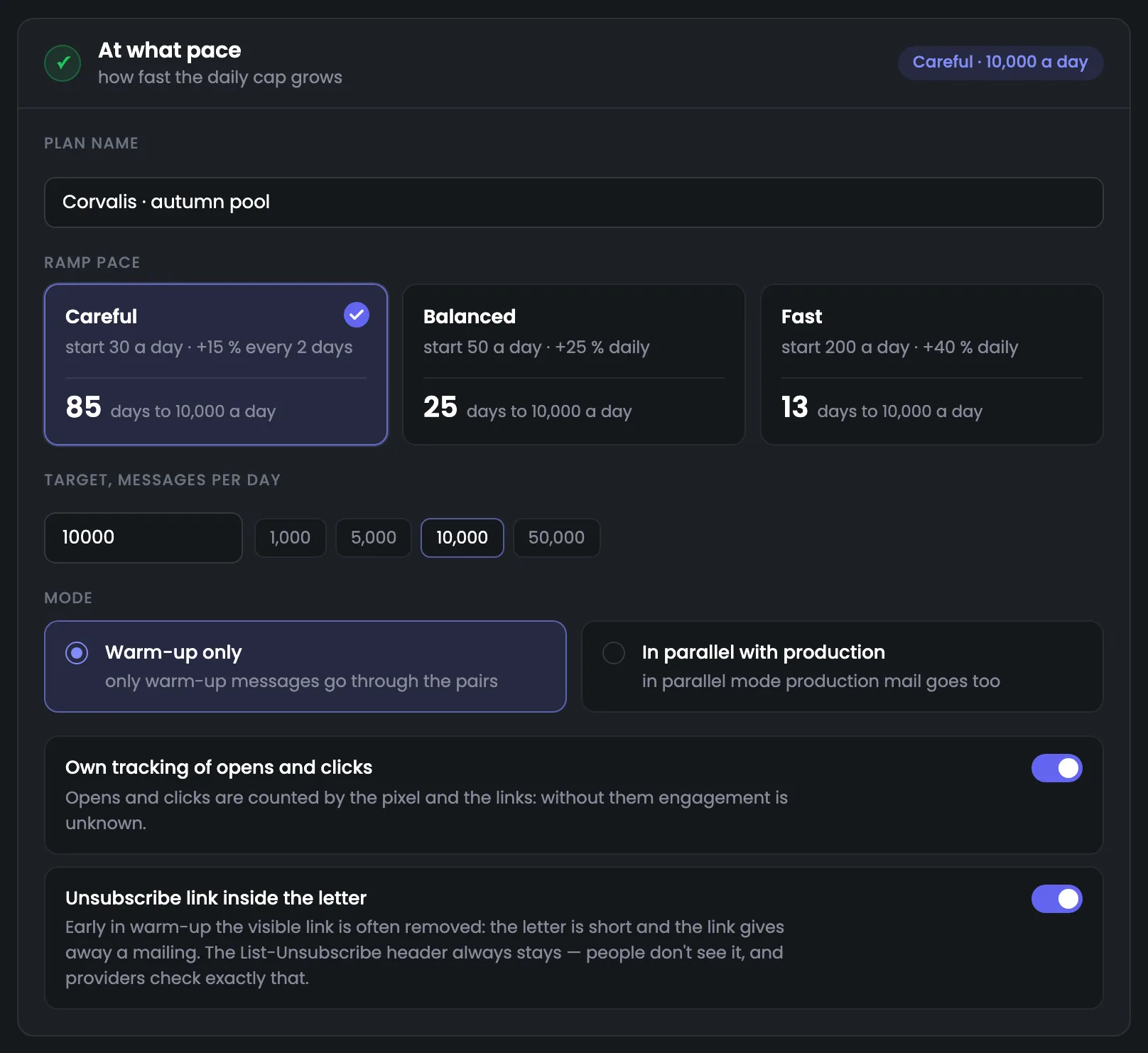
The third step is the name, pace, target and mode of the warm-up. Three ready-made paces — careful, balanced and fast — show right away how many days it will take to reach the target, so you can choose by time rather than by percentages. The target is one of the ready numbers or your own. The mode decides whether only warm-up emails go through the pairs or regular mailings too. Your own open and click tracking and a visible unsubscribe link are also switched on here. Compare the time needed with the date when you will need the addresses for mailings, and choose the pace to fit it. The “in parallel” mode is for when regular mailings already go through the same pairs, as with the Lumacart main pool.
EnlargeScreen 10 · At what pace. An example from the MTA-Hub interface.
Careful — start with 30 a day, +15% every 2 days — 85 days to 10,000.
Balanced — start with 50, +25% a day — 25 days.
Fast — start with 200, +40% a day — 13 days.
Target — 1,000, 5,000, 10,000, 50,000 or your own number.
Mode — warm-up only or in parallel with regular mailings.
Tracking and unsubscribe link — your own opens and clicks; a visible unsubscribe link in the email text.
The List-Unsubscribe header is always kept: people do not see it, but mail servers check exactly this header.
11
What you get
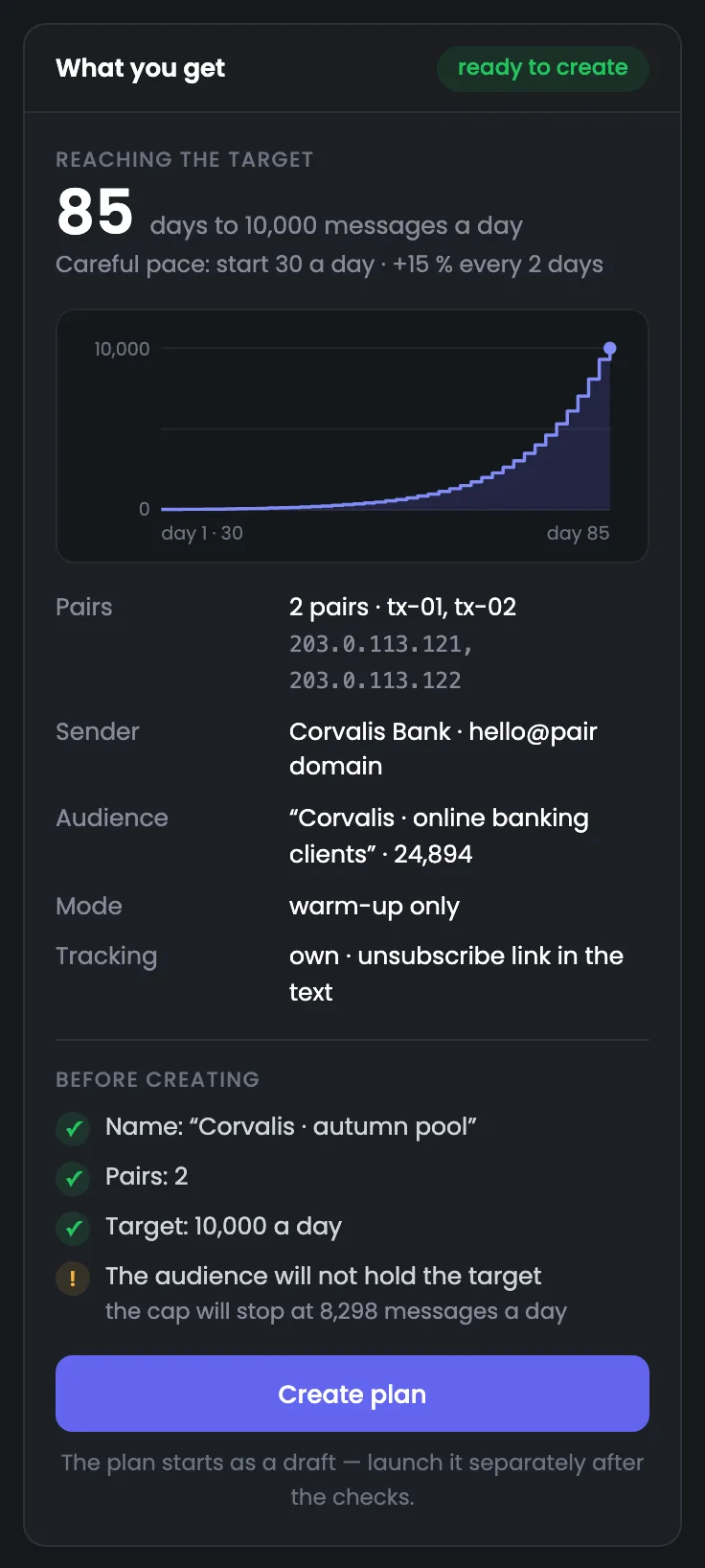
Summary before creating
The summary on the right stays in view the whole time you fill in the new warm-up plan form. At the top — how many days to the target and the volume growth chart; below — the pairs and their addresses, the sender, the list, the mode and tracking. At the bottom — what has already been checked and what is in the way: in the example the list cannot take the target, and the summary warns about it before the plan is created. The “Create plan” button creates a draft — not a single email goes out until the plan is started separately. Before clicking, look at the bottom block: checkmarks mean the name, pairs and target are set, and a warning means something on the previous steps is worth fixing — for example, the target is higher than the list can take.
EnlargeScreen 11 · What you get. An example from the MTA-Hub interface.
Reaching the target — 85 days to 10,000 emails a day.
Pairs — tx-01 and tx-02 — 203.0.113.121 and 203.0.113.122.
Before creating — name, pairs and target — green checkmarks.
Warning — the audience is not enough for the target: the limit is 8,298 emails a day.
Create plan — creates a draft.
The plan is created as a draft and started with a separate button after the checks.
06 / IP warm-up questions
Common questions about IP warm-up.
In short: how volume grows, who gets the emails and what happens to a paused plan.
Today, the path to the target and two weeks of warm-up progress: ramp-up, hold, rollback.
Why warm up an address?
Mailbox providers do not know a new address and meet a large volume from it with rejections and the “Spam” folder. Warm-up builds reputation gradually — starting with small volumes to real recipients.
How does the Hub decide whether to raise the volume?
Every night it looks at how the emails were received. Accepted well — the limit grows; a provider is holding mail back — it stays the same; most are rejected — roll back a step.
What is a “domain + address” pair?
A sending IP address together with the domain the emails are sent from. It is the pair that builds reputation, so each pair has its own step on the ladder.
Who gets the warm-up emails?
Real recipients from your own list who read your emails: tiers A and B without excluded addresses. Tier C does not go into the warm-up.
How many emails can my list take?
A plan emails one person no more than once every three days. The form works this out in advance: a list of 24,894 addresses can take no more than 8,298 emails a day.
What happens if I pause a plan?
The pairs’ limit is kept, and a break of up to a week costs nothing. If no emails go out for seven days or longer, the Hub rolls the pairs back by a third of the way they have come.
Can I warm up alongside regular mailings?
Yes. The “in parallel with production” mode lets regular mail go through the pairs too; the “warm-up only” mode sends only warm-up emails.
Why does the summary show fewer emails than were sent?
The Hub builds the summary overnight from mailbox providers’ responses. Today’s emails get into it after the next nightly count.
07 / Next step
Prepare the list and the emails for warm-up.
A warm-up plan emails real recipients from your own list. Who is in the warm-up audience and how many emails it can take is shown on a separate page.
Right next to it are the warm-up messages: what exactly recipients get while an address builds its reputation.