How many usable proxies public lists actually give.
Public lists of free proxies are huge but almost entirely dead. The proxy feed funnel shows at which step the stream gets filtered out: from a line in a list to an address fit for mail. It shows how much real value all your sources bring over the period.
All sources over 7 days
01 · Found416,251
02 · New2,282 · 0.6%
03 · Checked2,269
04 · Rejected2,262
05 · Fit7
Each step shows how many were filtered out: out of hundreds of thousands of lines, only a handful are fit for mail
Why so few are new
Fingerprint
The other addresses were already in the fleet or had been rejected earlier. A rejected address leaves a fingerprint: the next collection won’t add it again or waste a check on it.
HMTA-Hub
fingerprint
Already removed13,684 addresses
memory remainscollection won’t bring it back
Acceptance like a purchased one
No shortcuts
A new address goes through the same acceptance check as a purchased one: reachability, handshake, external address, port 25 — and only then gets a grade. Collected addresses never go into sending by themselves.
PProxy
acceptance
Fit over 7 days7 of 2,269
0.3% of checkedworking — 0
02 / The risks of free proxies
A free proxy is for list cleaning, not for mailings.
The whole email passes through a free proxy: recipient addresses, text, links. Its owner can read and alter the content — and can strip the encryption between mail servers along the way. The page warns about this in its very first line.
Where to use them
Cleaning and checks
Free addresses are used for list cleaning and checks, not for real mailings from your working domains.
PProxy
free
Fit forList cleaning
and checksnot for mailings
Grade D
Barred from mail
A grade D address — with port 25 closed — is barred from mail entirely, wherever it came from.
HMTA-Hub
grade
Grade DNot for mail
port 25 closednot allowed
03 / Sources
How many working proxies each source gives.
For each proxy feed you see how many addresses it gave, how many of them were new, how many have been fit over all time and how many are working now. A bar shows the share of fit addresses, those waiting for a check and rejected ones.
Working · hourly
SOCKS5 · text list
Last collection — 2,303 lines, 11 of them new. Fit over all time: 4 — under 0.1%.
Working · hourly
Card table
301 lines, 2 new, 2 fit over all time — under 0.1%. Addresses are read from the table’s links.
Needs a browser · daily
Ports in a script
The site is now behind a browser check. The row suggests what to do: download the list by hand and upload it as a file.
Disabled on Oct 12
HTTP · list mirror
The last collection gave 1,091 lines and 5 new ones, none of them fit.
The source bars are almost entirely red — that is what the truth about free lists looks like. 13,684 dead addresses have already been removed.
04 / Parsing lists
How the Hub reads pages with proxy lists.
The Hub reads text files, tables with links and pages where the port is printed by a script. The method is chosen on the first collection and remembered, and if it stops finding addresses, it is chosen again.
Method 1
Page text
Anything that looks like an address with a port — in a text file, a table or tags.
Method 2
Table links
Some sites keep the address and port in a link to a card — the protocol is taken from there too.
Method 3
Ports in a script
The port is printed by an expression on the page; the Hub works it out without a browser, but this breaks when the site changes.
List sites block robots, so the Hub presents itself as a browser — otherwise a source looks dead even though it works. Failures are named in plain words: browser check, site didn’t respond, stopped giving addresses.
05 / The interface in detail
The “Sources” section — 6 screens.
All screens of the proxy feeds section: the warning, the funnel, the list of sources, adding a source, parsing methods and the collection history. Above each screenshot: why the screen matters. Below it: what it shows.
Warning and funnel
2 screens
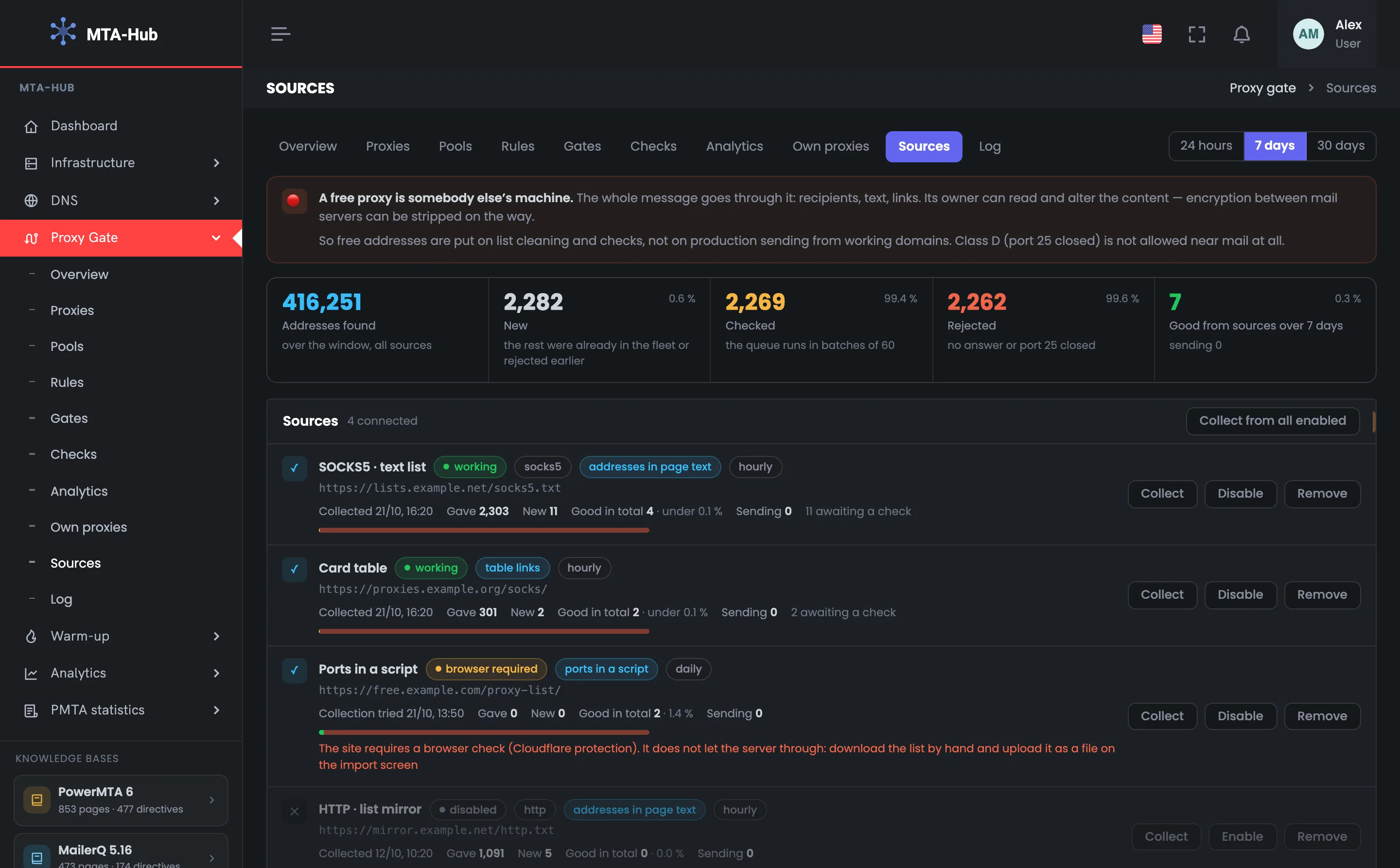
The page opens with a warning: a free proxy is someone else’s machine, and the whole email passes through it. Below — the funnel for the chosen period: how many addresses all sources found, and how many of them were new, checked, rejected and fit. This is the main answer to whether free lists make any sense.
01
A free proxy is someone else’s machine
The page’s main warning
The top of the proxy feeds page: the module tabs and the period — 24 hours, 7 or 30 days; the funnel below depends on the period. Under them is the page’s main warning, worth reading before you set anything up. The whole email passes through a free proxy — recipient addresses, text, links — and its owner can read and alter the content. The conclusion is simple: free addresses are fit for list cleaning and checks, but not for real mailings from your working domains. A grade D address with port 25 closed is barred from mail entirely, wherever it came from. Below — the funnel for the chosen period.
EnlargeScreen 01 · A free proxy is someone else’s machine. An example from the MTA-Hub interface.
Tab and period — this page is “Sources”; the period changes the funnel.
Red line — a free proxy is someone else’s machine: recipient addresses, text and links pass through it.
Second line — free addresses are for list cleaning and checks, not for real mailings from your working domains.
A grade D address with port 25 closed is barred from mail entirely.
02
Funnel
From a line in a list to a fit address
The proxy feed funnel over 7 days — five numbers from a line in a list to a fit address. On the right of each step is its share of the previous one, so you see where the stream gets filtered out. Out of 416,251 addresses found, only 2,282 are new, almost all of them failed the check, and 7 fit ones are left. The screen honestly shows the price of free lists: lots of lines, a handful of usable addresses, and even those don’t go into sending by themselves. If a source gives no fit addresses for weeks, you can disable it. Rejected addresses are remembered by fingerprint, so the next collection won’t add them again or spend checks on them.
EnlargeScreen 02 · Funnel. An example from the MTA-Hub interface.
Addresses found — 416,251 over the period, all sources.
New — 2,282 (0.6%) — the rest were already in the fleet or rejected earlier.
Checked — 2,269 (99.4%) — the queue runs in batches of 60.
Rejected — 2,262 (99.6%) — no answer or port 25 closed.
Fit — 7 (0.3%), 0 working.
A fit address from a list is not in sending yet: collected addresses don’t go into mailings by themselves.
Sources
2 screens
Next — the proxy feeds themselves: each with its state, parsing method, schedule and the haul of the last collection and of all time. The bar of fit addresses shows which source is worth keeping and which can be disabled. Here too is the form for adding a new source by link.
03
Sources
Each source’s haul
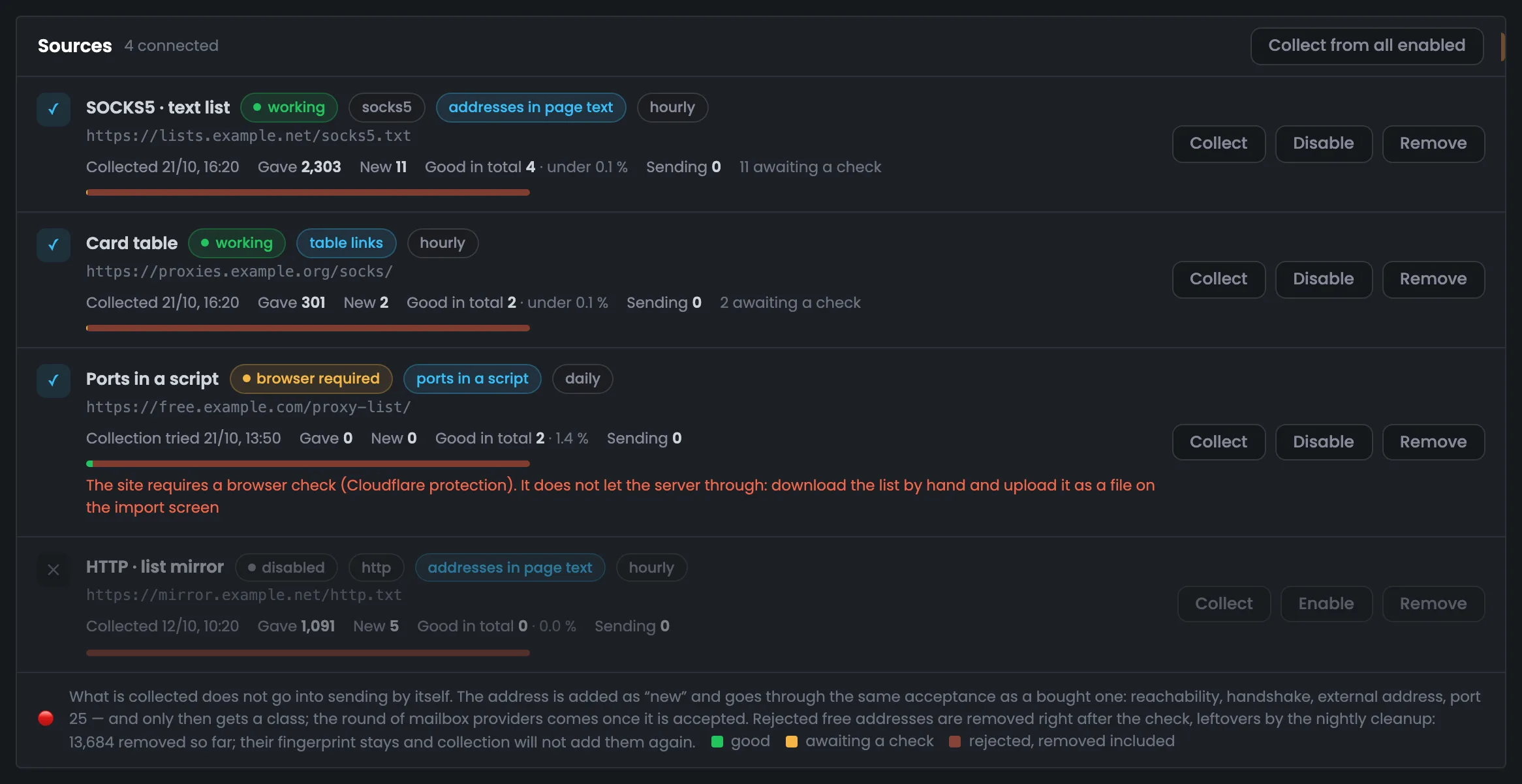
The list of connected proxy feeds — this is where you decide which source to keep. There are four, and for each you see the state, protocol, parsing method, schedule, link and the haul of the last collection. A colored bar shows the share of fit, waiting and rejected addresses, and for free lists it is almost entirely red. On the right — the “Collect”, “Disable” and “Remove” buttons, at the top — “Collect from all enabled”; if a collection broke, the row suggests what to do. Collected addresses don’t go into sending by themselves, and rejected free ones are removed right after the check; 13,684 have already been removed.
EnlargeScreen 03 · Sources. An example from the MTA-Hub interface.
SOCKS5 · text list — works hourly: gave 2,303, 11 new, 4 fit in total — under 0.1%, 11 waiting for a check.
Card table — read through the table’s links: 301, 2 new, 2 fit in total — under 0.1%.
Ports in a script — needs a browser: the site is behind Cloudflare protection; the row suggests downloading the list by hand and uploading it as a file.
HTTP · list mirror — disabled, last collection on Oct 12.
Bar — green — fit, yellow — waiting for a check, red — rejected, including removed ones.
Collected addresses don’t go into sending by themselves. Rejected free addresses are removed right after the check, the rest by the nightly cleanup; 13,684 have already been removed.
04
Add a source
Link, name, protocol, schedule
The form for adding a new proxy feed. It needs four fields: a link to the list page or file, a name, a protocol and a collection schedule — hourly, daily or manual. The “Check and add” button downloads the page right away and won’t save a source if there are no addresses on it, so an empty link never gets into the list, and the protocol can be detected from the page or set by hand. The Hub itself turns a link to a GitHub page into a link to the “raw” file. The Hub picks how to read the page on its own at the first collection — that is the next screen.
EnlargeScreen 04 · Add a source. An example from the MTA-Hub interface.
Link — to the list page or file.
Name — how to show the source in the list.
Protocol — detect from the page or set by hand.
Collection — hourly, daily or manual.
The Hub itself turns a link to a GitHub page into a link to the “raw” file — otherwise it would find zero addresses there.
Parsing and collection history
2 screens
At the bottom — how the Hub reads pages with lists and what happened during the latest collections. The Hub picks the parsing method itself, so almost any list will do. If a collection broke, the history row names the reason in plain words.
05
How the Hub reads a page
Three parsing methods
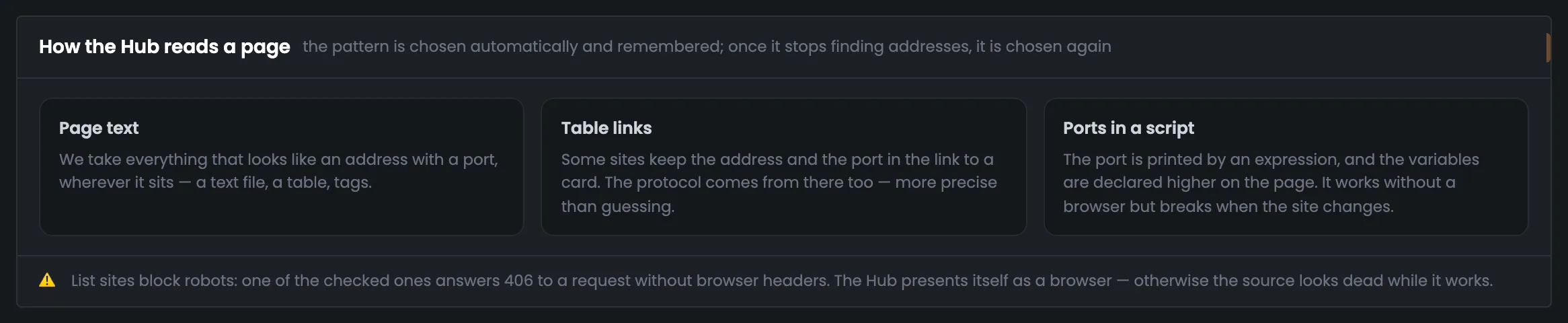
A reference block on how the Hub reads pages with proxy lists — useful if a source suddenly stops giving addresses. There are three methods: addresses in the page text, the address and port in table links, and a port printed by a script. The method is chosen automatically on the first collection and remembered, and if it stops finding addresses, it is chosen again. At the bottom it explains why the Hub presents itself as a browser: some sites refuse robots. Failures are named in plain words: browser check, site didn’t respond, stopped giving addresses. Such rows show up in the collection history below.
EnlargeScreen 05 · How the Hub reads a page. An example from the MTA-Hub interface.
Page text — anything that looks like an address with a port, wherever it is.
Table links — the address and port from a link to a card; the protocol comes from there too.
Ports in a script — the port is printed by an expression; worked out without a browser, but breaks when the site changes.
One of the tested sites answers 406 to a request without browser headers — without the disguise the source would look dead.
06
What happened
Latest collections
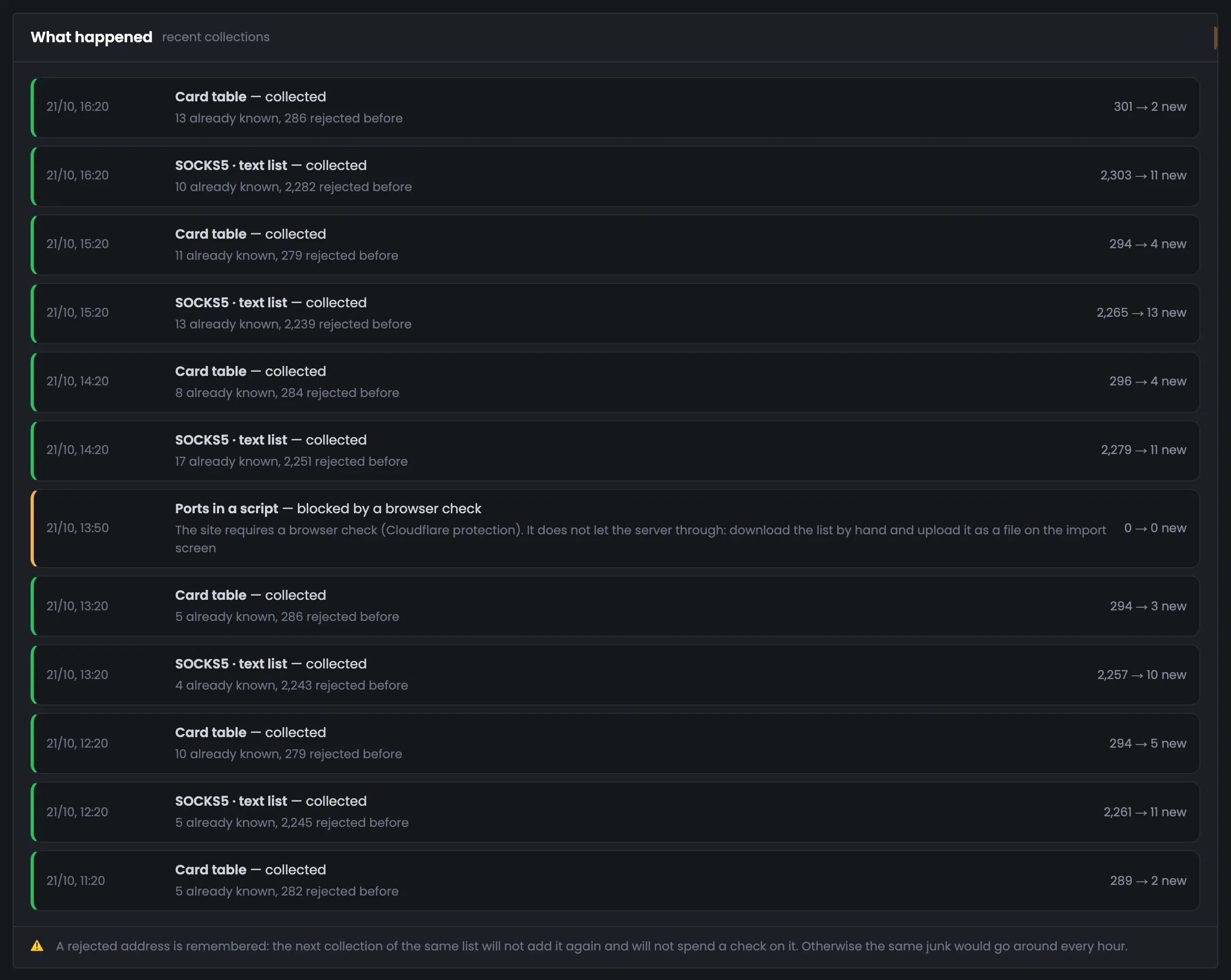
The proxy feed history: the last twelve collections, each in its own row — when, which source, how it ended, how many lines it gave and how many of them were new. The color of the stripe on the left is the collection result, so a broken source stands out at once. For example, “Card table” at 16:20 gave 301 lines but only 2 of them were new, while “Ports in a script” at 13:50 ran into a browser check. At the bottom it explains why a rejected address won’t come back with the next collection. If a source keeps running into a browser check, download the list by hand and upload it as a file on the import screen.
EnlargeScreen 06 · What happened. An example from the MTA-Hub interface.
The state, parsing method and schedule of each source, its haul, and a hint if a collection broke.
Can I send mailings through free proxies?
Better not. The whole email passes through a free proxy, and its owner can read and alter it. Such addresses are used for list cleaning and checks.
Why are there so few new addresses?
Most lines are addresses that are already in the fleet or were rejected earlier. The Hub adds only new ones.
Will a rejected address come back with the next collection?
No. It leaves a fingerprint, and collection from sources won’t add it again. A manual import will add such an address and check it again.
Do collected addresses go into sending by themselves?
No. A new address goes through the same acceptance check as a purchased one and gets a grade, and it is added to a pool separately — with the pool’s “Add proxy” button.
What if a site requires a browser check?
Download the list by hand and upload it as a file on the import screen — the source row suggests this itself.
How often should a list be collected?
Hourly, daily or manually — this is set for each source.
Can I add a GitHub link?
Yes. The Hub itself turns a page link into a link to the “raw” file with the list.
How do I know whether a source is worth keeping?
By the funnel and the number of fit addresses over all time. If a source gives no fit addresses for weeks, you can turn it off with the “Disable” button in its row.
07 / Next step
Take a look at the proxy log.
Collections, checks, rule triggers and people’s actions — everything that happened to your proxies is recorded in the module log.
How each collected address is checked is shown on the “Checks” page, and the whole route — from the MTA through the gate to the recipient — in the module overview.