Who pulled a proxy and how the address comes back.
If an address dropped out of sending, the key thing is to understand who decided it. That determines whether the address comes back on its own, through a rule’s action, or only by hand. That’s why every record in the proxy log has its author on the right: the MTA, a rule, a person or the system.
Record author
01 · MTALets it back on a timer
02 · RulePer the rule’s action
03 · PersonBrought back by hand
04 · SystemHub checks
An address dropped out of sending — the column on the right says who decided and how the address comes back
Pulled by the MTA
Comes back on its own
Once an hour the Hub asks PowerMTA which addresses it has pulled and records the pull in the MTA’s name. When the MTA lets the address through again, a return record appears.
MMTA
poll
px-04 and gmail.comPulled and returned
01:40 → 04:40repeats: 2
A rule fired
Per its action
From there everything follows the rule’s action: an address in quarantine is brought back by a check after the term — into the pool’s reserve — while one retired for good doesn’t come back. An address pulled by a person waits until someone brings it back by hand.
HMTA-Hub
rule
px-06 to quarantineDelivered 82.02%
pool ruleOct 23, 14:00
02 / The week’s events
A week of proxy event history.
Besides pulls, the log keeps everything that changes your proxy fleet: rule firings, blacklists, grade changes, gate table writes, import and acceptance. Here’s the week from the example — one record per card.
Rule · today, 00:00
Rental is running out
px-05: one day of rent left — notification only.
System · yesterday, 04:10
Blacklists
The check round found px-06 on SpamCop, Barracuda and PSBL.
Rule · yesterday, 14:00
Quarantine
“Delivery rate dropped” sent px-06 to quarantine at 82.02%.
System · yesterday, 14:00
Gate table
The Hub rewrote the gate table on mta-02 right away — two addresses are left in it.
System · yesterday, 21:00
Grade C → D
A recheck found port 25 closed on px-06.
Person · Oct 21
Import and acceptance
A person imported px-09, and acceptance rejected it at the “port 25” step.
Repeats fold into one row: if the MTA keeps an address pulled for hours, the log shows the pull as one row with a counter — “repeats: 2 · since 01:40”.
03 / Filters
Log filters and CSV export.
You filter the proxy log by author, event group, address and pool, and the period follows the panel’s calendar. The export repeats what’s on screen.
Author buttons
Who decided
All, person, rule, MTA, system — and you see in advance how many rows will remain.
Event groups
What happened
Pulls and swaps, quarantine, checks, collection and import, blacklists, DNS, gates, rent.
Period
By the panel’s calendar
“1 day” is since midnight in the panel’s time, “7 days” is seven days including today.
Export
CSV as on screen
The same filters and columns plus a server column; times are in your profile’s time zone.
“Only what changed the state” hides informational records, and the search looks at the address, the proxy name and the event text.
04 / How records are written
Why you can trust the proxy log.
Log records are created by the Hub itself — exactly when something happens. That’s why you can trust the log: there’s no after-the-fact retelling in it.
Who writes
The Hub itself
For a rule — when it fires; for a check — when it changes the grade or finds the address on blacklists; for the MTA — during the hourly poll; for a person — when they click a button.
HMTA-Hub
event
Log recordAt the moment of the event
author namedpanel time
In the reader’s language
Not a ready-made phrase
A record’s text isn’t stored as a ready-made phrase — it’s assembled in the language of whoever reads it. When an address is deleted, its records go with it — one remains, about the deletion itself.
HMTA-Hub
deletion
After the address is deletedOne record
about the deletion itselfthe rest go with the address
05 / The interface in detail
The “Log” section — 4 screens.
All the proxy log screens: filters, the week’s events, the MTA’s decisions and a month of blacklists. Above each screenshot: why the screen matters. Below it: what it shows.
Filters
1 screen
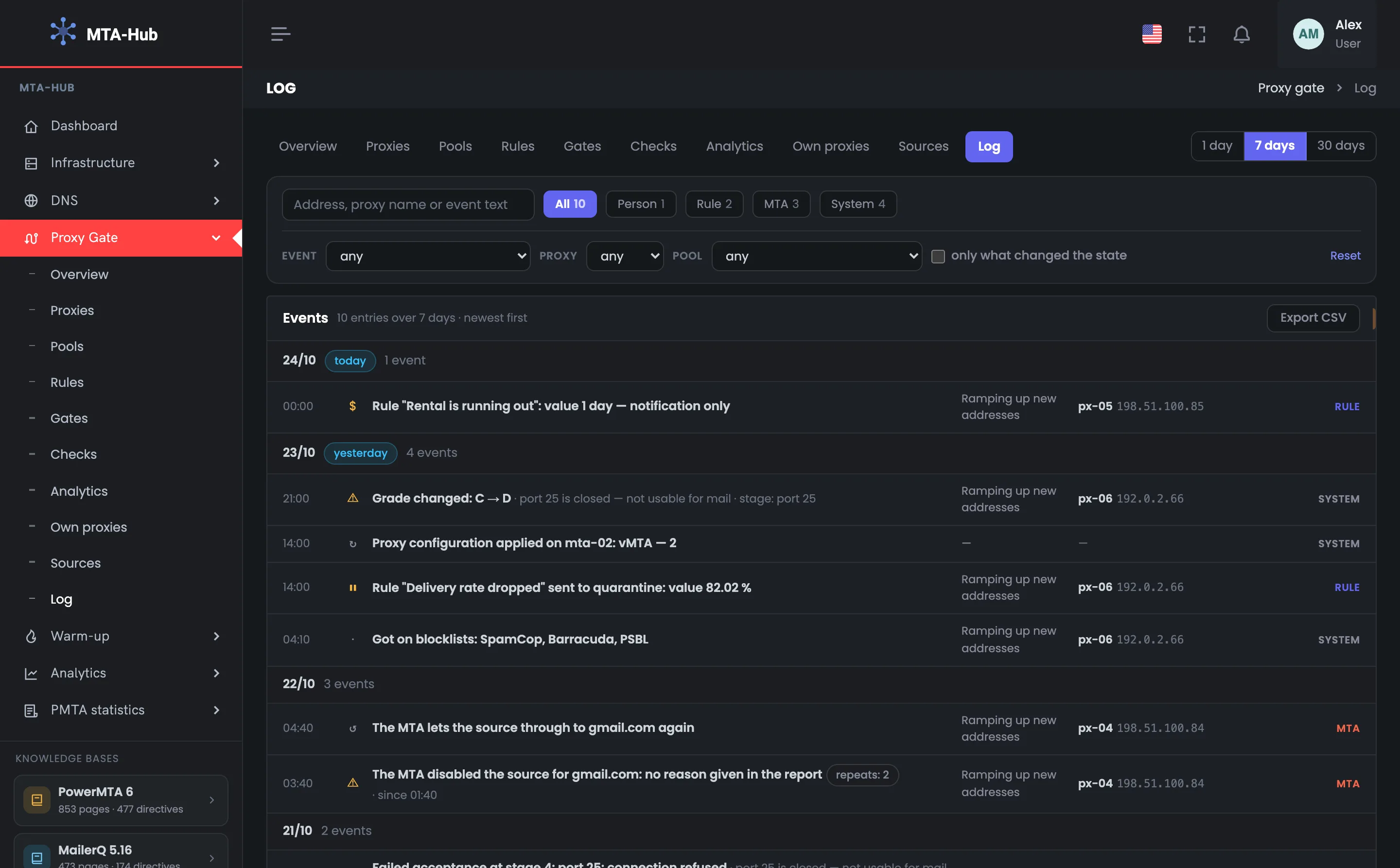
At the top is everything you filter the proxy log by: period, search, author buttons with record counts, event kind, proxy, pool and “only what changed the state”. The filters help you quickly find the history of one address or all the decisions of one author. The CSV export repeats what’s on screen.
01
Filters
Period, search, authors and filters
The proxy log filter panel: this is where you start when you need to find out what happened to a specific address. At the top are the module tabs and the period: 1 day, 7 or 30 days. Below them — a search by address, proxy name and event text, and author buttons with the number of records for the period. Further down — event kind, proxy, pool and the “only what changed the state” tick box; “Reset” clears all filters at once. The numbers on the buttons show in advance how many rows will remain. For example, the “MTA” button leaves only pulls and returns from the sending server, and the “blacklists” group leaves records about getting listed; both selections are shown below.
EnlargeScreen 01 · Filters. An example from the MTA-Hub interface.
Search — by address, proxy name and event text.
Author buttons — all 10, person 1, rule 2, MTA 3, system 4.
Event, proxy, pool — drop-down filters.
Only what changed the state — hides informational records.
Reset — clears all filters at once.
The numbers on the author buttons take the other filters into account — you see in advance how many rows will remain.
Events
3 screens
Below are the events themselves, by day, newest first. On the right of each record are the pool, the proxy with its external address, and the author. The author’s label tells you right away whether the address will come back on its own or has to be brought back by hand. Three screens show the whole week, the decisions of one MTA, and a month of blacklists.
02
The week’s events
Ten records by day
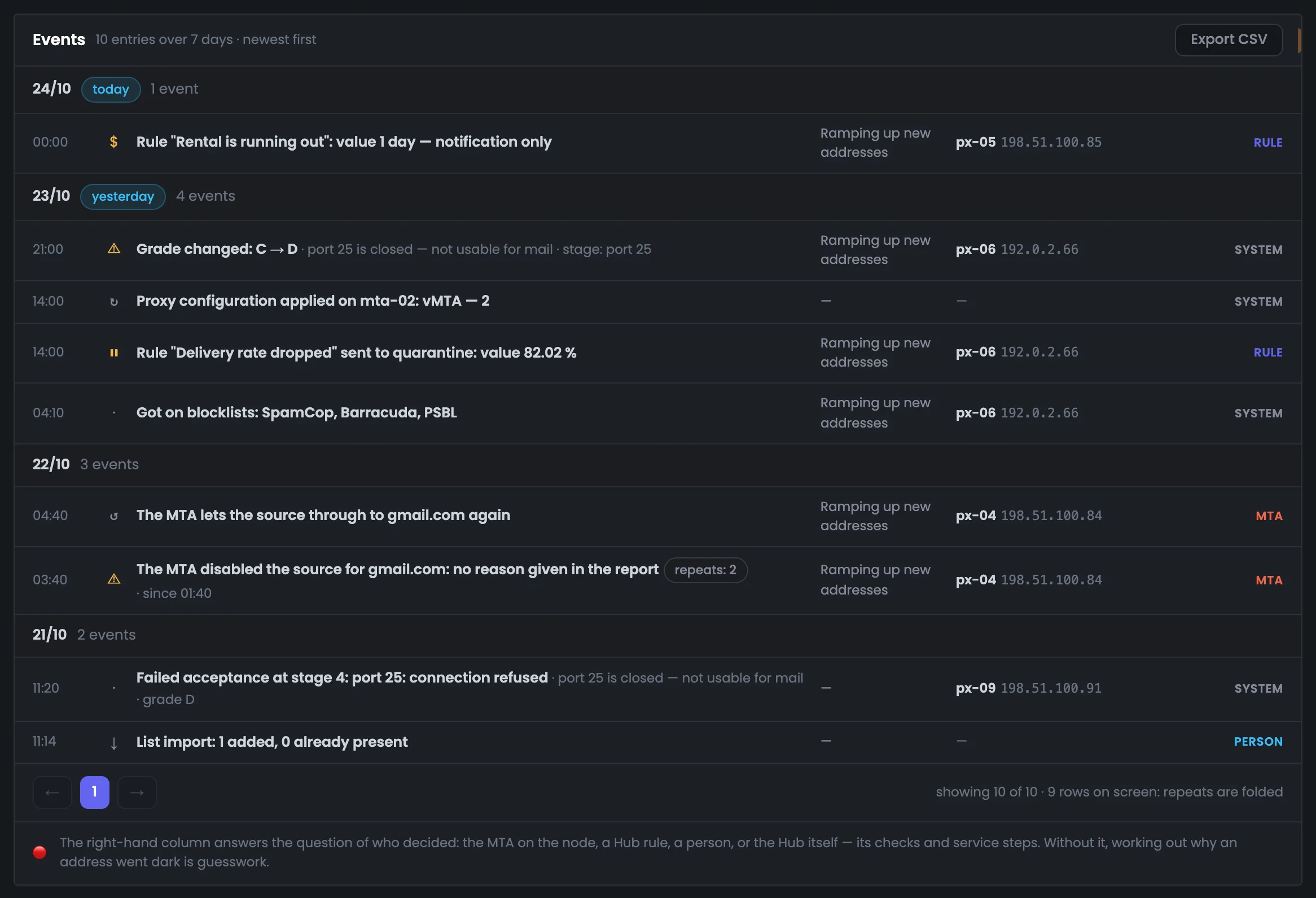
A week of proxy event history: ten records by day, newest first. On the right of each — the pool, the proxy with its external address, and the author. The screen lets you trace an address’s story: for example, yesterday px-06 landed on blacklists, a rule sent it to quarantine, the gate on mta-02 got a new table right away, and in the evening the grade dropped from C to D. At the top is the “Export CSV” button; at the bottom — how many records are shown and how many rows are on screen. Repeats fold into one row: the MTA’s two records about pulling px-04 sit in a single row, so there are 10 records but 9 rows on screen. The CSV exports the same as on screen, plus a server column.
EnlargeScreen 02 · The week’s events. An example from the MTA-Hub interface.
Today, 00:00 · rule — “Rental is running out”: px-05, value 1 day — notification only.
Yesterday, 04:10 · system — px-06 landed on SpamCop, Barracuda and PSBL.
Yesterday, 14:00 · rule and system — px-06 to quarantine at 82.02%; the gate table on mta-02 rewritten — vMTA 2.
Yesterday, 21:00 · system — px-06 grade: C → D, port 25 closed.
Oct 22 · MTA — pulled px-04 for gmail.com (repeats: 2 · since 01:40) and let it through again at 04:40.
Oct 21 · person and system — list import: 1 added; px-09 failed acceptance at the “port 25” step.
“Showing 10 of 10 · 9 rows on screen: repeats folded” — the MTA’s two pull records sit in a single row.
03
What the MTA decided
Pull, repeat and return
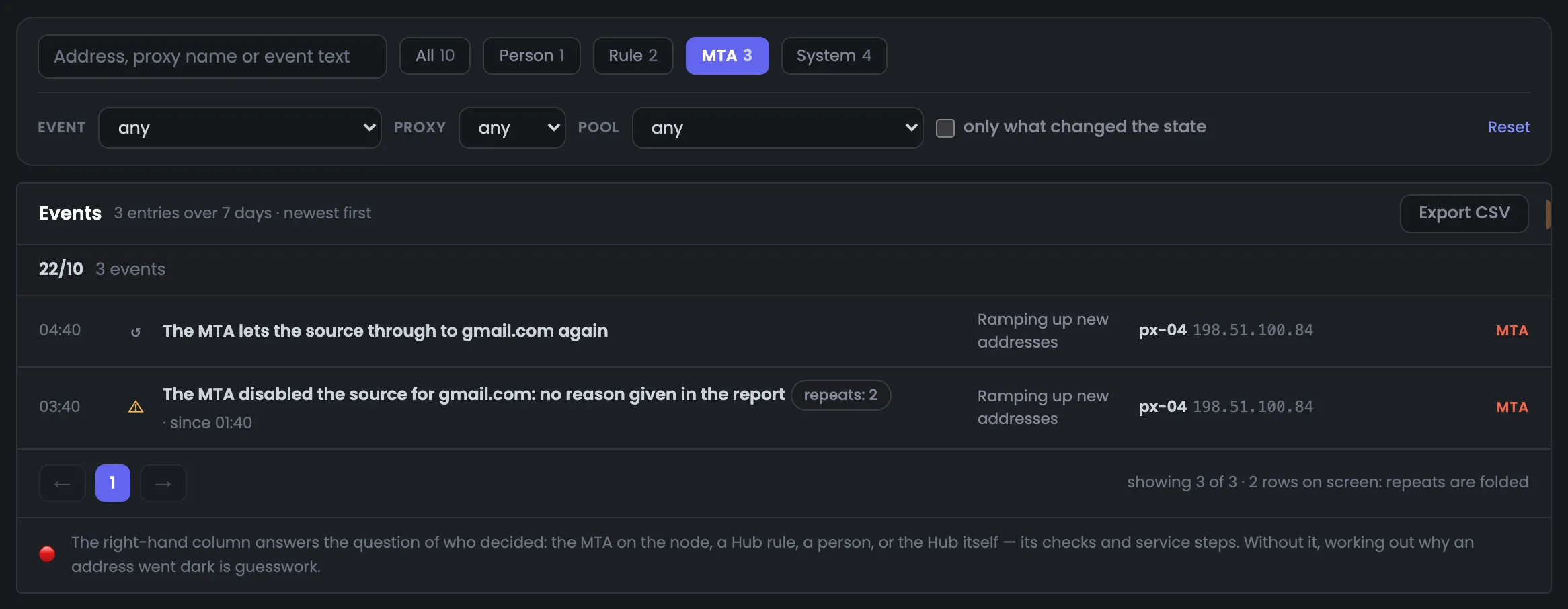
The proxy log with the “MTA” button on — only the decisions of the sending server itself. Three records remain: the pull of px-04 for gmail.com, its repeat and the return. The repeat is folded with the pull into one row — “repeats: 2 · since 01:40” — so a long pull doesn’t clog the log. By the 04:40 poll the address was no longer in the report, and the pull closed by itself. The takeaway: an address pulled by the MTA needs no intervention — it comes back on the MTA’s timer. PowerMTA 6.0 doesn’t give the reason in its report — and the log says exactly that rather than making one up. The “Ramping up new addresses” pool has no “pulled by the MTA” rule, so the address stayed in sending.
EnlargeScreen 03 · What the MTA decided. An example from the MTA-Hub interface.
03:40 · pull — the MTA pulled px-04 for gmail.com; PowerMTA 6.0 gives no reason in its report — and the record says so.
Repeats: 2 · since 01:40 — the first pull was recorded at 01:40, the repeat at 03:40.
04:40 · return — “The MTA lets the address through to gmail.com again” — the pull is closed and doesn’t hang in “Needs attention”.
The “Ramping up new addresses” pool has no “pulled by the MTA” rule, so the address stayed in sending.
04
Blacklists over 30 days
Informational records
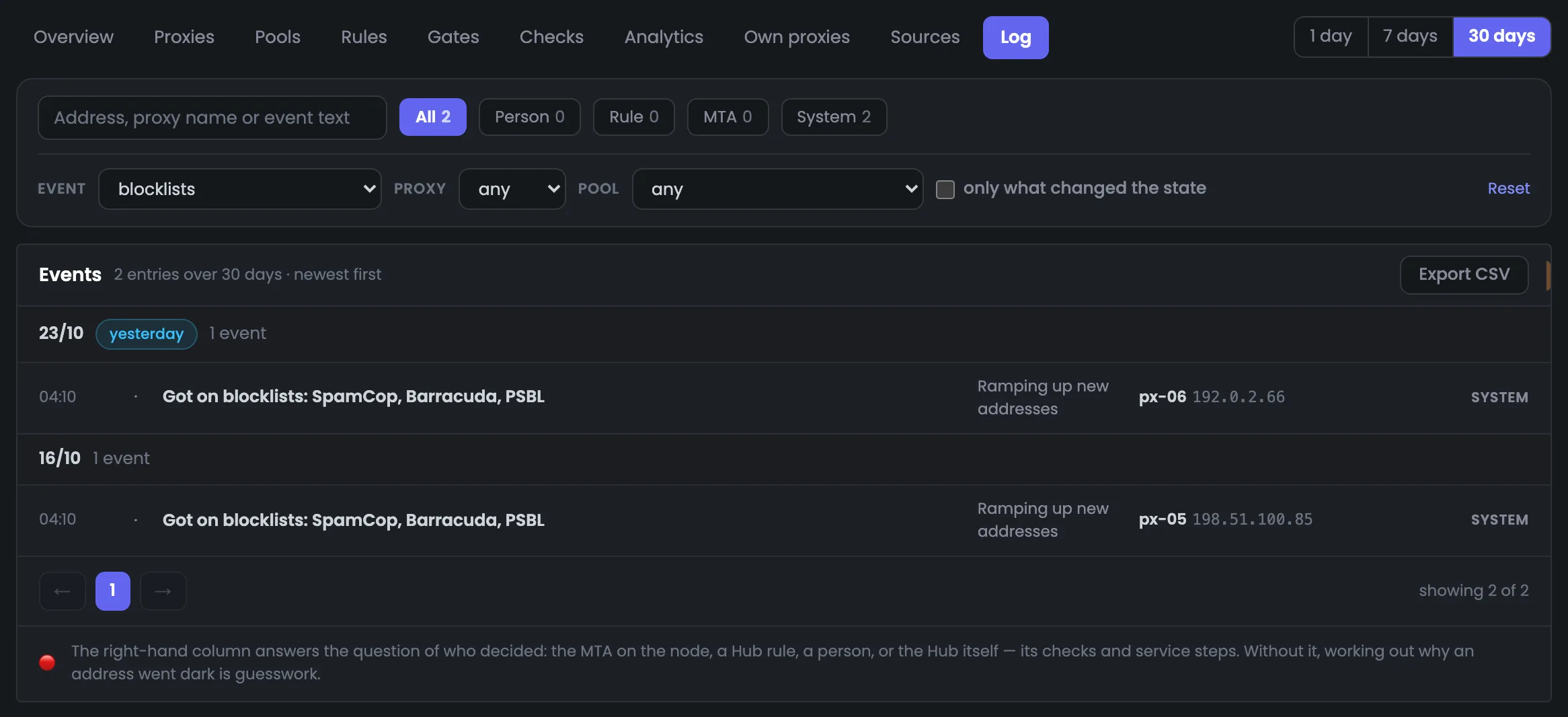
The proxy log filtered by the “blacklists” group over 30 days. Two system records: px-06 yesterday and px-05 on Oct 16, both on SpamCop, Barracuda and PSBL. Blacklists are checked once a day, during the check round, which is why both records are at 04:10. Such a record is informational, with no color: what matters is its consequence — the address’s grade drops to C, and that shows up in “Needs attention”. The author buttons count with the same filter. For px-05 the B → C drop is listed there with the reason “listed on blacklists”, while px-06 was already at C. What to do next with such addresses is decided by the pool’s rules, for example “Blacklisted”.
EnlargeScreen 04 · Blacklists over 30 days. An example from the MTA-Hub interface.
px-06 · Oct 23, 04:10 — landed on SpamCop, Barracuda and PSBL.
px-05 · Oct 16, 04:10 — landed on the same three lists.
Author buttons — all 2, system 2, the rest 0.
Such a record is informational, with no color: what matters is its consequence. Getting listed lowers the grade to C, and for px-05 the B → C drop is listed in “Needs attention”.
06 / Questions about the log
Common questions about the proxy log.
In short: how to use the log to understand why an address dropped out of sending and whether it will come back.
The “MTA” button: the pull of px-04 for gmail.com, its repeat in one row, and the return.
How do I find out why an address dropped out of sending?
Find it in the log and look at the column on the right: the MTA, a rule, a person or the system. How the address comes back depends on the author.
Will an address pulled by the MTA come back?
Yes, on the MTA’s timer. Once an hour the Hub asks PowerMTA about pulled addresses, and when an address is let through again, a return record appears in the log.
Why does the MTA say “no reason given in the report”?
PowerMTA 6.0 doesn’t give the reason for a pull in its report. The log says exactly that rather than making up a reason.
What does “repeats: 2” mean?
While the MTA keeps an address pulled, each poll records the pull again. The log folds such records into one row with a counter and the time of the first record.
Will an address come back from quarantine?
Yes: after the term a check brings it back — into the pool’s reserve. One retired for good won’t come back, and one pulled by a person waits until someone brings it back by hand.
Why is a blacklist record shown without color?
It’s informational; what matters is its consequence: getting listed lowers the grade to C, and that drop is listed in “Needs attention”.
What goes into the CSV?
The same as on screen: the same filters and columns plus a server column. Times are in your profile’s time zone, and the zone is named in the column header.
What happens to the records of a deleted address?
They’re deleted together with the address. One record remains — about the deletion itself.
07 / Next step
Set up rules so you decide less by hand.
The log tells you who decided what. To make fewer decisions by hand, set up pool rules — then the log will show that an address was pulled by a rule, not by a person.
The module overview shows the whole route — from the MTA through the gate to the recipient — and leads to any Proxy Gate tab.