A proxy on your own VPS with a clean address history
Your own proxy servers. A proxy on your own VPS with one button.
Any server of yours with an external address can become a proxy: the Hub adds its addresses to the fleet, installs an exit service and lets only your sending servers through it.
Entry and exit are the same address: you order its reverse DNS record under your own domain name, and you know the address’s history from day one.
Your VPS with an external address becomes your own proxy server: the Hub installs an exit service on it and lets only your sending servers through. The address the gate connects to and the address the mailbox provider sees are one and the same.
Server vds-01
01 · ServerExternal address
02 · ButtonMake a proxy
03 · Servicehubgate exit
04 · FleetOn a par with rented ones
The Hub adds the server’s addresses to the fleet, installs the exit service and lets in only your sending servers
Who the service lets in
Only your nodes
The exit service on vds-01 lets in only mta-01 and mta-02 — the servers of the pools where its addresses work. There’s no password: access is granted by your servers’ addresses.
Vvds-01
lets in
Lets in onlymta-01, mta-02
192.0.2.11192.0.2.12
Reverse DNS
FCrDNS matches
Entry and exit are the same address, so you order the reverse DNS record from the hosting provider under your own domain name. It matches the forward record, and mail servers see that.
HMTA-Hub
check
Reverse DNSOwn on 3 of 3
FCrDNS matcheschecked Oct 21
02 / Own or rented
How your own proxy differs from a rented one.
Your own address gives you what a rental doesn’t come with: your own reverse DNS, a clean history, and the certainty that no stranger is sending mail from the same address. The price is renting the server and looking after it.
Reverse DNS
Yours or someone else’s
On your own — yours, and FCrDNS matches. On a rented one — someone else’s, and Microsoft and Yahoo can see that.
Address history
From day one
Your own address is clean from day one. Anyone could have sent anything from a rented one before you.
Who else uses it
Nobody
Your own address — nobody. A free one — anyone, at the same time as you.
Authorization
No password
Your own proxy lets in connections from your servers’ addresses. A rented one uses a login and password in clear text.
Outbound port 25
Depends on the hosting provider
On your own it’s checked when the address is accepted; on a rented one it’s usually closed.
Price and effort
VDS rent
Your own — server rent plus upkeep. A rented one is cheaper, with nothing to install.
03 / Make a proxy
How to set up a proxy on a free server.
The page suggests servers with an external address that aren’t busy with other work yet. The “Make a proxy” button adds their working IPv4 addresses to the fleet and installs the exit service — no need to log in to the server and set up the proxy by hand.
A free server
vds-02
vds-02 — 203.0.113.171, two working IPv4 addresses. “Make a proxy” adds them to the fleet as own proxies on port 1080 and installs the exit service.
Vvds-02
make a proxy
Will become proxies2 IPv4 addresses
port 1080exit service
Where such servers come from
The “Own proxy” role
A server for proxies is connected in the “Nodes” section with the “Own proxy” role — no MTA is installed on it. If there are no free servers, the page names what keeps the rest busy.
HMTA-Hub
nodes
Server roleOwn proxy
“Nodes” sectionno MTA
04 / Server vds-01
Address checks on your own proxy server.
For each server you see what’s installed on it, who the service lets in and what the checks of its addresses found. “Blacklists not asked yet” is an answer of its own, not “clean”.
Address checks
3 of 3
Port 25 is open on all three addresses, reverse DNS is your own and matches the forward record, and the blacklists are clean. The last check was on Oct 21 at 11:00.
HMTA-Hub
check
Port 25 and PTR3 of 3
lists — cleanOct 21, 11:00
Addresses in pools
On a par with rented ones
px-10 works in “Sending · marketing”, px-11 in “Ramping up new addresses”, both with their own subdomain. px-12 waits in the marketing reserve.
Vvds-01
pools
Server addressespx-10 · px-11 · px-12
2 sending1 in reserve
The addresses of one server are usually in one subnet — mailbox providers see them as one source: the reputation is shared, and blocking one drags down the rest.
05 / The interface in detail
The “Own proxies” section — 4 screens.
All the screens of the own proxy servers section: the idea of the page, how they differ from rented ones, free servers, and the card of a server running the exit service. Above each screenshot: why the screen matters. Below it: what it shows.
The idea and differences
2 screens
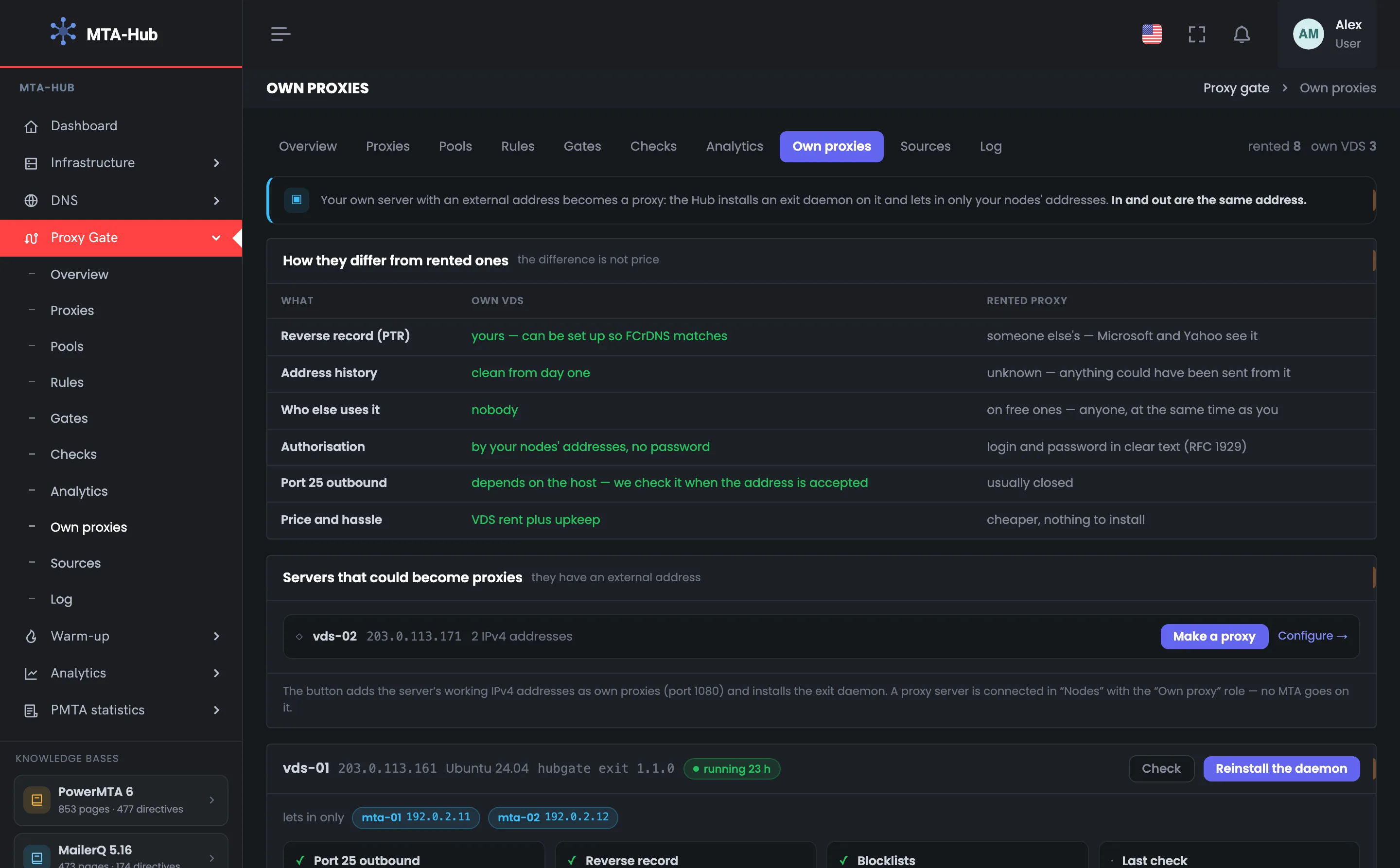
The page starts with the idea: your server with an external address becomes a proxy, and its entry and exit are the same. Below — six differences between your own server and a rented proxy, side by side in one table. These two screens help you decide whether to keep your own proxy servers instead of, or alongside, rented ones.
01
Your own server as a proxy
The page’s idea in one line
The top of the “Own proxies” page: the module tabs and a proxy count by type — 8 rented, 3 own VDS. The count shows at a glance what share of your fleet runs on your own servers. Below it — the page’s idea in one line: your server with an external address becomes a proxy, the Hub installs an exit service on it and lets in only the addresses of your sending servers. Your own proxy’s entry and exit are the same address, and all its advantages follow from that. Any server of yours with an external address can become your own proxy, and the next screen shows how it differs from a rented one.
EnlargeScreen 01 · Your own server as a proxy. An example from the MTA-Hub interface.
Tab — this page is “Own proxies”.
Count on the right — 8 rented · 3 own VDS.
Hint — the Hub installs an exit service on the server and lets in only the addresses of your sending servers.
Any server of yours with an external address can become your own proxy.
02
How they differ from rented ones
The difference isn’t the price
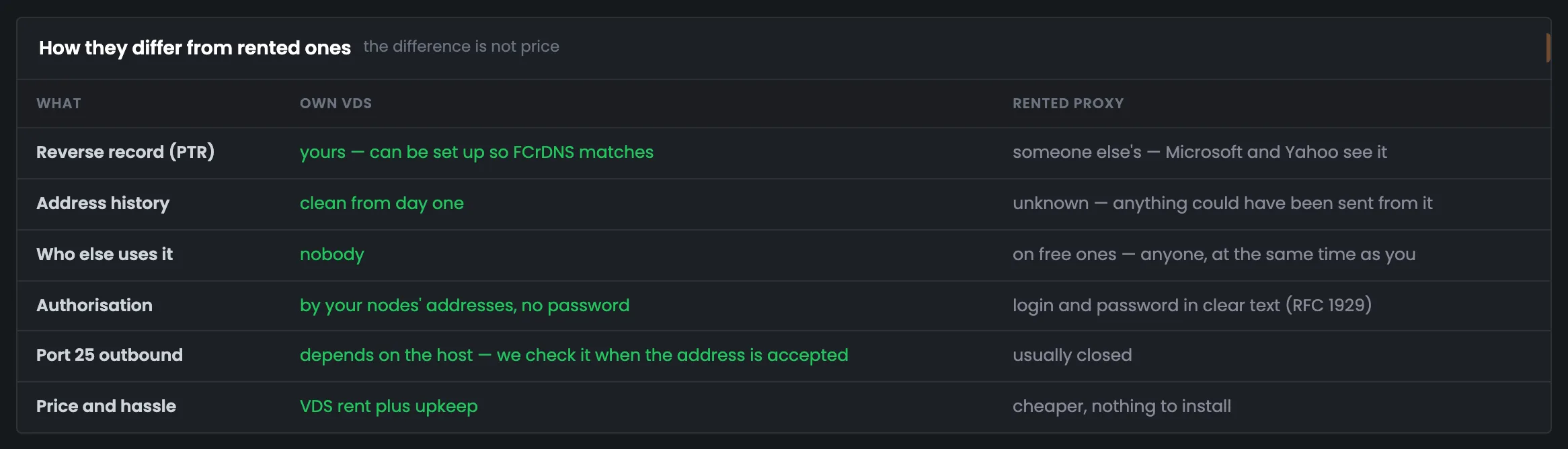
Six differences between your own proxy server and a rented proxy — in one table: on the left, what your own address gives you; on the right, what you get with a rented one. The screen helps you decide what’s worth paying for: your own reverse DNS, a clean history from day one, no strangers on the same address, and access without a password. In return — VDS rent and upkeep, and port 25 depends on the hosting provider. The main difference isn’t the price, but who is responsible for the address’s reputation. The login and password of a rented SOCKS5 proxy travel in clear text — that’s how the protocol itself works — while your own proxy lets in connections from your servers’ addresses, with no password.
EnlargeScreen 02 · How they differ from rented ones. An example from the MTA-Hub interface.
Reverse DNS (PTR) — your own can be set up so FCrDNS matches; someone else’s — Microsoft and Yahoo can see that.
Address history — clean from day one, versus unknown.
Who else uses it — nobody, versus “anyone” for free ones.
Authorization — by your servers’ addresses, no password, versus a login and password in clear text.
Outbound port 25 — depends on the hosting provider and is checked when the address is accepted; on a rented one it’s usually closed.
Price and effort — VDS rent plus maintenance, versus “cheaper, nothing to install”.
The login and password of a rented SOCKS5 proxy travel in clear text — that’s how the protocol itself works.
Servers
2 screens
Next — the servers themselves. First the free ones, which you can turn into proxies with the single “Make a proxy” button. Then the ones already working: with the exit service, the list of allowed servers, address checks and where each address sits in the pools.
03
Servers that can become proxies
Free servers with an external address
A list of servers where you can set up your own proxy: they have an external address and aren’t busy with other work yet. In the example it’s vds-02 — 203.0.113.171, two working IPv4 addresses. The “Make a proxy” button adds both addresses to the fleet as own proxies on port 1080 and installs the exit service; the “Configure” link leads to the server’s card. If there are no free servers, the page names what keeps the rest busy; a new server for proxies is connected in “Nodes” with the “Own proxy” role. No MTA is installed on such a server. After “Make a proxy”, its addresses work in pools on a par with rented ones.
EnlargeScreen 03 · Servers that can become proxies. An example from the MTA-Hub interface.
Server row — vds-02, 203.0.113.171, 2 IPv4 addresses.
Make a proxy — adds the addresses to the fleet as own proxies on port 1080 and installs the exit service.
Configure — leads to the server’s card.
Caption at the bottom — a server for proxies is connected in “Nodes” with the “Own proxy” role — no MTA is installed on it.
If there are no free servers, the page names what keeps the rest busy: a gate, their own sending, no external address, a server not in service.
04
Server vds-01
Service, checks and addresses
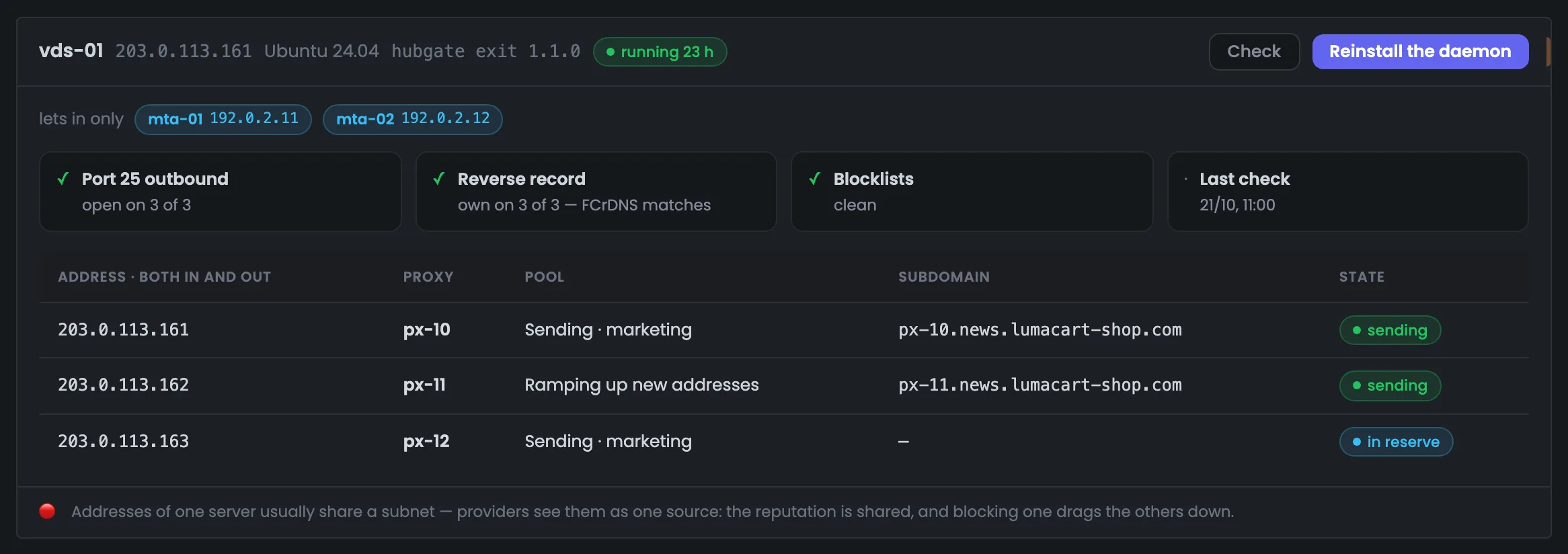
The card of the working proxy server vds-01: its address, OS, exit service version and how long it’s been running. Below — who the service lets in (only mta-01 and mta-02), four checks and the table of the server’s addresses. This is where you see whether the addresses are fit for mail: port 25 is open on 3 of 3, reverse DNS is your own on 3 of 3, the blacklists are clean. The “Check” and “Reinstall the daemon” buttons poll the server again or put a fresh service file in place. At the bottom is a warning about the shared reputation of one server’s addresses. Mailbox providers see the addresses of one server as one source, so blocking one drags down the rest.
EnlargeScreen 04 · Server vds-01. An example from the MTA-Hub interface.
Header — 203.0.113.161, Ubuntu 24.04, hubgate exit 1.1.0, running for 23 h.
Check and Reinstall the daemon — poll the server again; put a fresh service file in place and rewrite the list of allowed addresses.
Lets in only — mta-01 192.0.2.11 and mta-02 192.0.2.12.
Checks — port 25 open on 3 of 3, own reverse DNS on 3 of 3, blacklists clean, last check on Oct 21 at 11:00.
Address table — the address (it’s both the entry and the exit), proxy, pool, subdomain and state.
The addresses of one server are usually in one subnet: mailbox providers see them as one source, and blocking one drags down the rest.
06 / Questions about own proxies
Common questions about your own proxy servers.
In short: how a server becomes a proxy, who it lets in, and why it’s worth spreading out the addresses of one server.
Who the service lets in, checks across all the server’s addresses, and where each address works.
What is an “own proxy”?
A server of yours with an external address on which the Hub has installed the exit service. Its addresses work in pools just like rented ones, and their entry and exit are the same.
How is it better than a rented one?
Your own reverse DNS, a clean history, and no strangers on the same address. You don’t get that with a rental.
Is a password needed?
No. The exit service lets in only the addresses of your sending servers — the ones where this server’s addresses work.
Can I install an MTA on such a server?
No. A server for proxies is connected in “Nodes” with the “Own proxy” role, and no MTA is installed on it.
What does “Reinstall the daemon” do?
It puts a fresh exit service file in place and rewrites the list of allowed addresses.
When are new addresses checked?
The first check happens at the scheduled recheck, after that — on the schedule set on the “Checks” page. Port 25 on your own server depends on the hosting provider.
Why are the addresses of one server a shared risk?
They’re usually in one subnet, and mailbox providers see them as one source. The reputation is shared, and blocking one address drags down the rest.
What does the mark next to an allowed address mean?
Each allowed address shows which of your servers in the Hub it belongs to. An address that belongs to no server is marked: the list may be out of date.
07 / Next step
Set up sources of free proxies.
Your own proxies are the most reliable addresses in the fleet, but also the most expensive. The Hub collects free addresses from public lists, and their sources are set up separately.
Where your own servers’ addresses work is set in pools, and the whole route — from the MTA through the gate to the recipient — is shown in the module overview.