Sending server
NodeThe sending server whose gate routes mail through the pool’s proxies. In the settings dialog you see next to the server whether its gate is running.
HMTA-Hub
gate
Pool nodemta-01
gate runninghubgate 1.1.0

A proxy pool becomes a pool in PowerMTA
A pool ties a group of proxies to a sending server and a domain. Mail goes through that server’s gate, and each address gets its own subdomain in the domain’s zone.
A pool has its own share of spare addresses, its own recheck interval and its own replacement rules. An address outside pools sends no mail.
01 / What a pool is made of
A pool answers two questions: which server to send mail through, and in which domain to give the addresses their subdomains. One proxy belongs to exactly one pool, so for every address it’s always clear where and on whose behalf it works. The pool’s name becomes a pool in PowerMTA.
Mail goes through the node’s gate, and each address gets its own subdomain in the domain’s zone
The sending server whose gate routes mail through the pool’s proxies. In the settings dialog you see next to the server whether its gate is running.
In the domain’s zone each address gets its own subdomain — that’s what the recipient’s mail server sees. Next to the domain you see whether its signing key is active.
02 / Reserve and replacement rules
Each pool has its own reserve share and its own replacement rules. The Hub watches whether there are enough spare addresses and says right on the card which rules actually apply. Spare addresses wait in the pool and replace a proxy that fails.
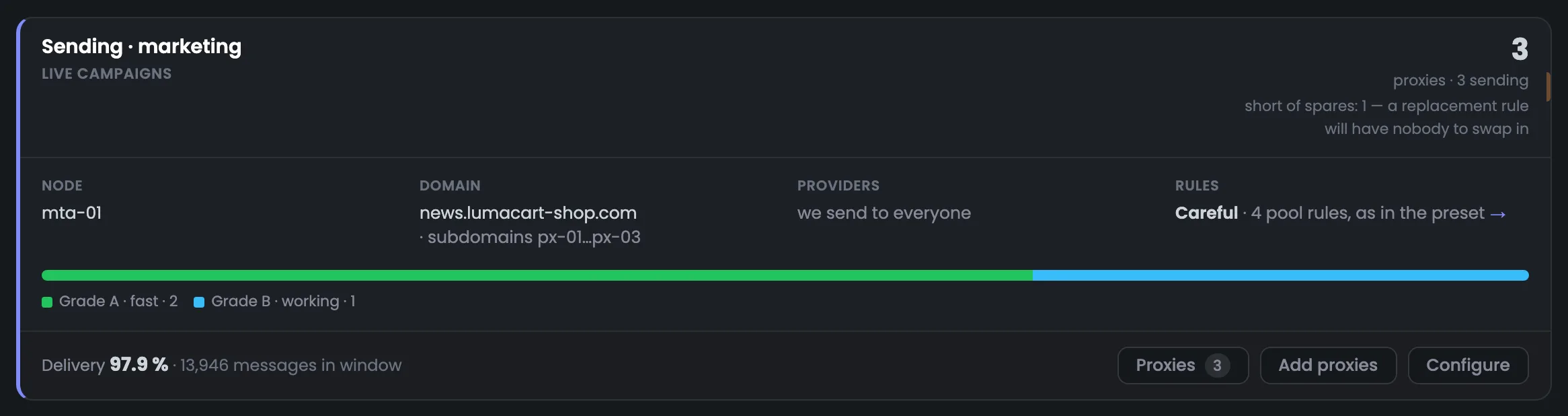
Three addresses, all sending, and no spares. The card warns: if an address goes bad, the replacement rule will have nothing to swap in.
The pool’s label is “Careful”: quarantine at the first doubt. Next to it, the card says what actually applies: four pool rules, as in the preset.
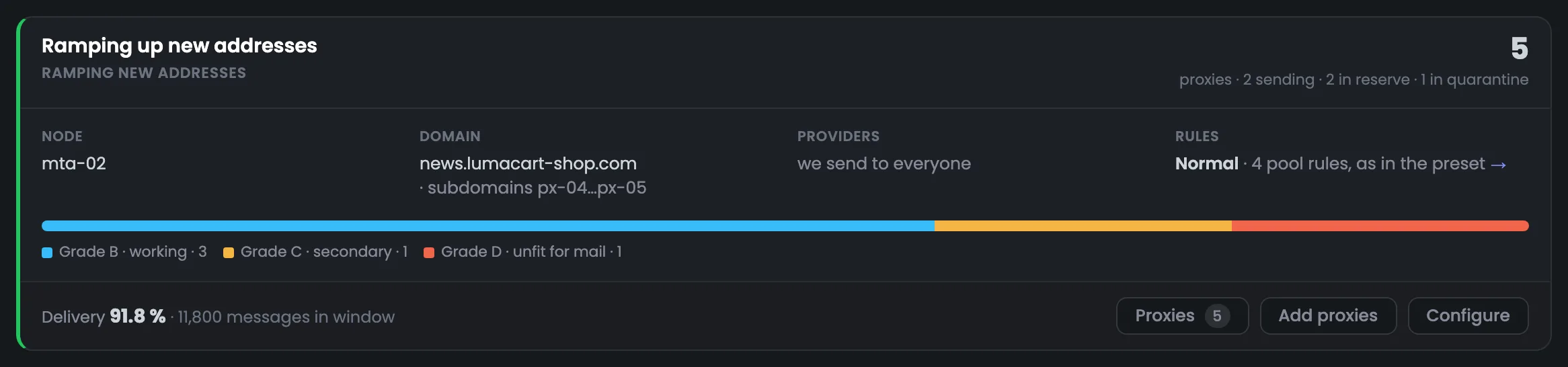
Five addresses: two sending, two in reserve and one in quarantine — port 25 closed on px-06. The spares px-07 and px-08 are ready to replace it.
The pool’s label is “Normal”: default thresholds. Four pool rules apply, as in the preset.
“Careful”, “Normal” and “Hard” are just the pool’s label. The replacement rules themselves are set on the “Rules” tab, where you can replace them with a ready-made set.
03 / Outside pools
An address outside pools sends no mail. That’s why there’s an “Outside pools” block under the pool cards, and the total at the bottom matches the number of addresses in the Hub — no proxy gets lost.
The total across pools and the “Outside pools” block always equals the number of addresses in the proxy list
Sending addresses are taken out of sending, fit ones get the “accepted” state and wait in the “Outside pools” block.
Collection from public lists won’t add it again, while a manual import will add it and check it again.
Even if the address failed the check, it stays in the proxy list until you delete it yourself.
04 / Pool settings
A pool is created and changed in a separate dialog. Next to each field is its status: whether the gate is running, whether the signing key is active, which PowerMTA pool it becomes. And the dialog names risky changes in advance.
The pool’s name becomes a pool in PowerMTA. If you rename the pool, the PowerMTA pool name doesn’t change — the configuration on the server doesn’t break.
Such a change moves the proxies to another server or another domain. The dialog warns in advance: sending stops until the new DNS records are visible everywhere.
05 / The interface in detail
Proxy pool cards, addresses outside pools, the settings dialog and adding to a pool. Above each screenshot: why the screen matters. Below it: what it shows.
The “Pools” tab shows each pool as a separate card. It shows at a glance how many addresses the pool holds and in what state, which server and domain it works with, which grades of addresses it’s built from and how it delivered mail over the selected period. The “Proxies” button opens the pool’s addresses right inside the card.
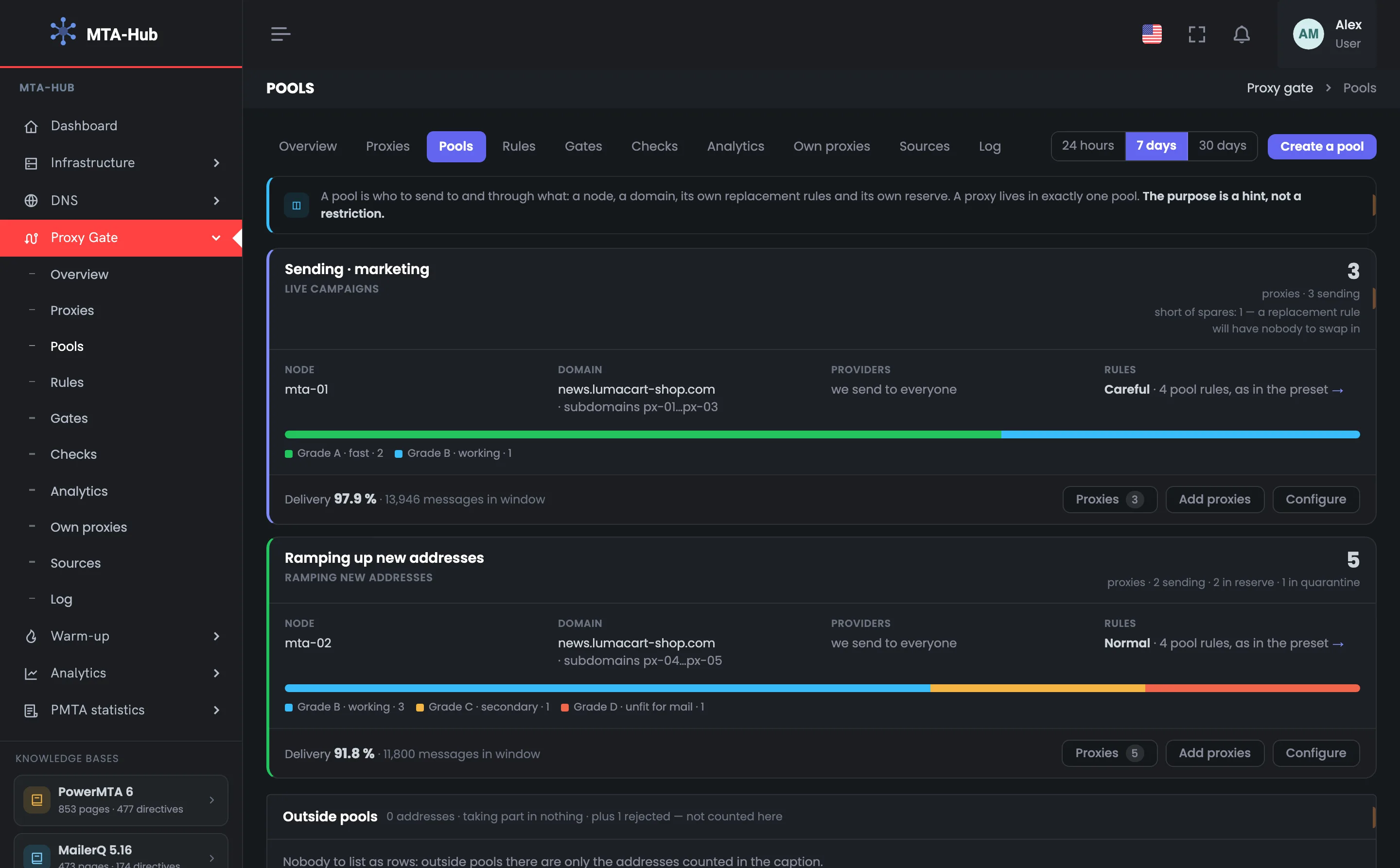
The proxy pools page starts with the module tabs, a period choice and the “Create a pool” button. Below is a short hint on what a pool is: who to send to and through what — a server, a domain, replacement rules and a reserve. It also reminds you of the key point: a proxy belongs to exactly one pool, and a pool’s purpose is a hint, not a restriction. The period — 24 hours, 7 or 30 days — only changes the message data on the cards; the makeup and settings of the pools don’t depend on it. If there are no pools yet, this is where you start: create a pool, then fill it with fit addresses from the proxy list.
 Enlarge
A pool’s purpose is a hint, not a restriction: it helps you understand what the pool is for but doesn’t limit anything.
The card of a pool for live campaigns on the mta-01 server. The pool has three addresses, all sending, subdomains px-01…px-03 in the news.lumacart-shop.com domain, and the “Careful” rules. The reserve share is 30%, yet there are no spare addresses, and the card warns about it right under the address count: if an address goes bad, the replacement rule will have nothing to swap in. At the bottom — deliverability over the week, 13,946 messages and 97.9% delivered, and the buttons for working with the pool. The pool is made up of two grade A addresses and one B; to cover the missing spare, you add a fit address to the pool with the “Add proxies” button.
 Enlarge
The pool’s reserve share is 30%. With three sending addresses, at least one spare is needed, otherwise the replacement rule will have nothing to swap in.
The second pool works on the mta-02 server and is made up of five addresses of varying quality. Two addresses are sending, two wait in reserve, one is in quarantine — port 25 closed on px-06. The grade bar shows the mix right away: three B addresses, one C and one D. The pool’s deliverability is 91.8% of 11,800 messages: it includes px-06’s messages sent before quarantine. The card shows that there are spares for replacement and that the address that went bad has already been pulled from sending. Deliverability also includes the messages of px-05, which Yahoo doesn’t accept; the pool’s address table helps you sort it out — the “Proxies” button opens it.
 Enlarge
Deliverability includes both px-06’s messages sent before quarantine and the messages of px-05, which Yahoo doesn’t accept.
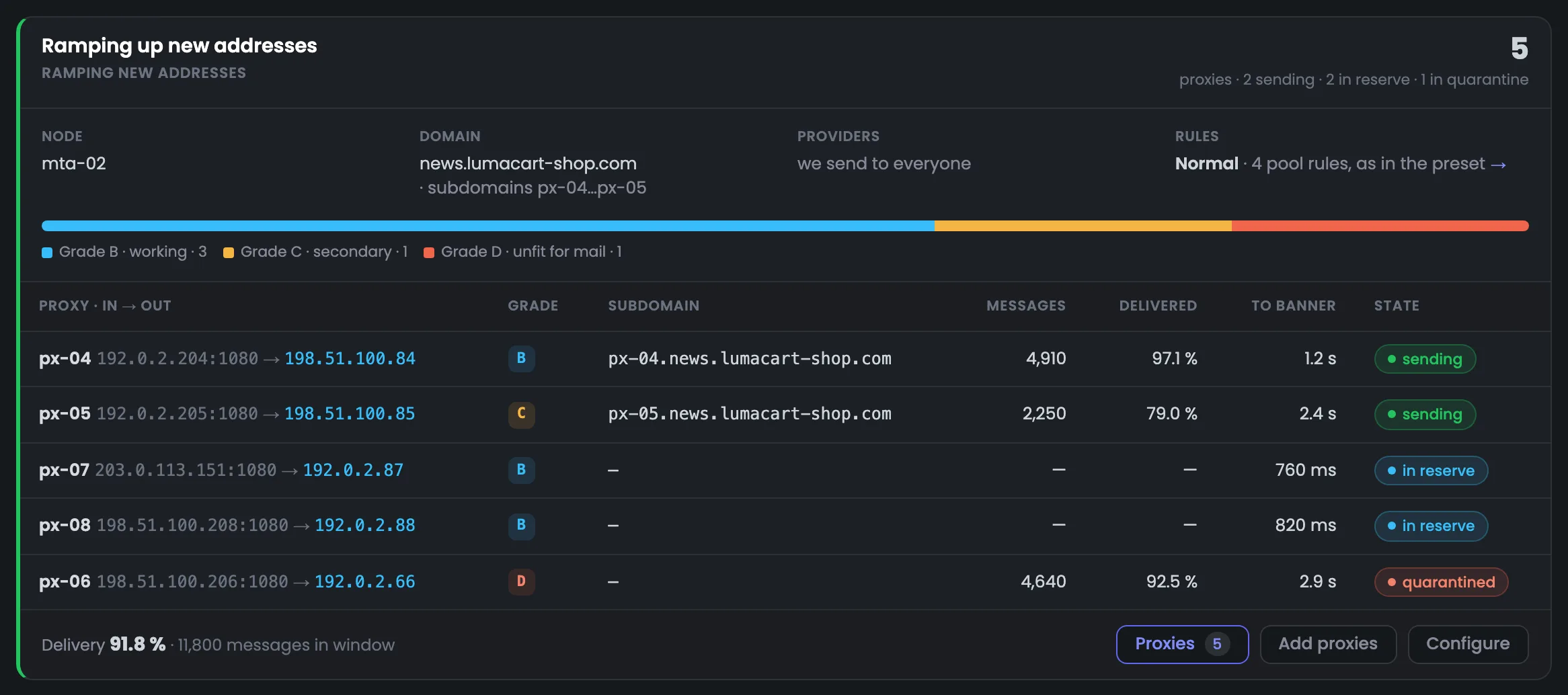
The “Proxies” button opens the pool’s addresses right inside the card — no need to go to another tab. The table shows how each address is doing: subdomain, how many messages it sent, what share arrived, how fast the mail server answers and what state the address is in. In the example px-05 delivers 79.0% and gets the mail server’s greeting only after 2.4 s — that’s where to start digging. The address’s name takes you to its page. The reserve addresses px-07 and px-08 have no subdomain or messages yet — a subdomain is issued when the address is put into sending — and px-06 is in quarantine with grade D.
 Enlarge
The reserve addresses px-07 and px-08 haven’t sent yet: they have neither a subdomain nor messages — a subdomain is issued when the address is put into sending.
Under the pool cards is the “Outside pools” block. It shows addresses that aren’t in any pool and so send no mail. The caption at the bottom adds up the addresses of all pools and this block — the total matches the number of proxies in the Hub.
The “Outside pools” block shows addresses that aren’t in any pool and so send no mail. In the example there are none: outside pools there’s only the rejected px-09, which is counted in the caption but not shown as a separate row. At the bottom it explains what happens to rejected addresses: a free one is deleted with a fingerprint, while bought ones and your own VDS stay in the Hub. The total “3 + 5 + 1 = 9” matches the number of proxies. Addresses of a deleted pool also land here: sending ones are taken out of sending, and fit ones get the “accepted” state and wait until they’re added to another pool.
 Enlarge
The total across pools and the “Outside pools” block always matches the overall number of addresses — no proxy gets lost.
A pool is created and configured in a separate dialog and filled straight from the proxy list. The dialog shows the state of the server and the domain before you save and warns in advance about changes that will stop sending. When adding addresses, the Hub says plainly which pool an address will be taken from.
The “Configure” dialog of the “Sending · marketing” pool. Here you change the name, purpose, server, domain, rules label, reserve and recheck interval. Next to the fields you see their status: the gate on mta-01 is running, the domain’s signing key is active, and in PowerMTA it is the proxy-pool-1 pool, whose name doesn’t change on rename. A red line warns in advance that changing the server or domain will stop sending until the new DNS records are visible everywhere. You can also see that with a 30% reserve the pool is one spare address short, and the recheck is set to every 24 h.
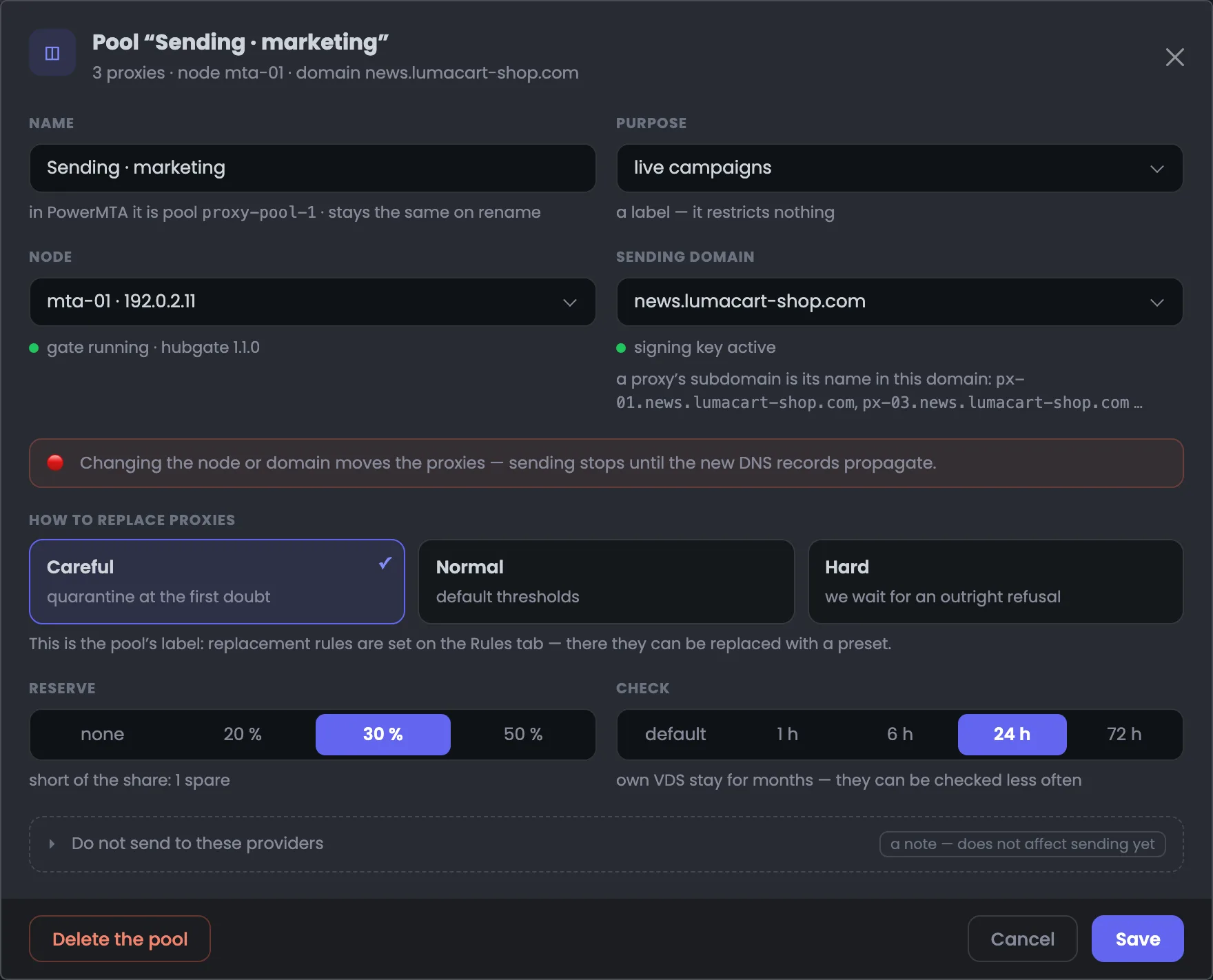 Enlarge
You can delete the pool from the same dialog. The addresses stay in the Hub and move to the “Outside pools” block.
The “Create a pool” dialog has the same fields as the settings. From the name reserve-eu you see right away which PowerMTA pool it becomes — proxy-pool-reserve-eu. In the example the purpose “waiting to step in” is chosen, the mta-01 server with a running gate and the news.lumacart-shop.com domain with an active signing key. At the bottom of the dialog is a summary of what you’ll get: server, domain, 30% reserve and the default check. So before you even save, it’s clear where and on whose behalf the new pool will work. While the new pool is empty it sends nothing — you add addresses to it right after creating it with the “Add proxies” button.
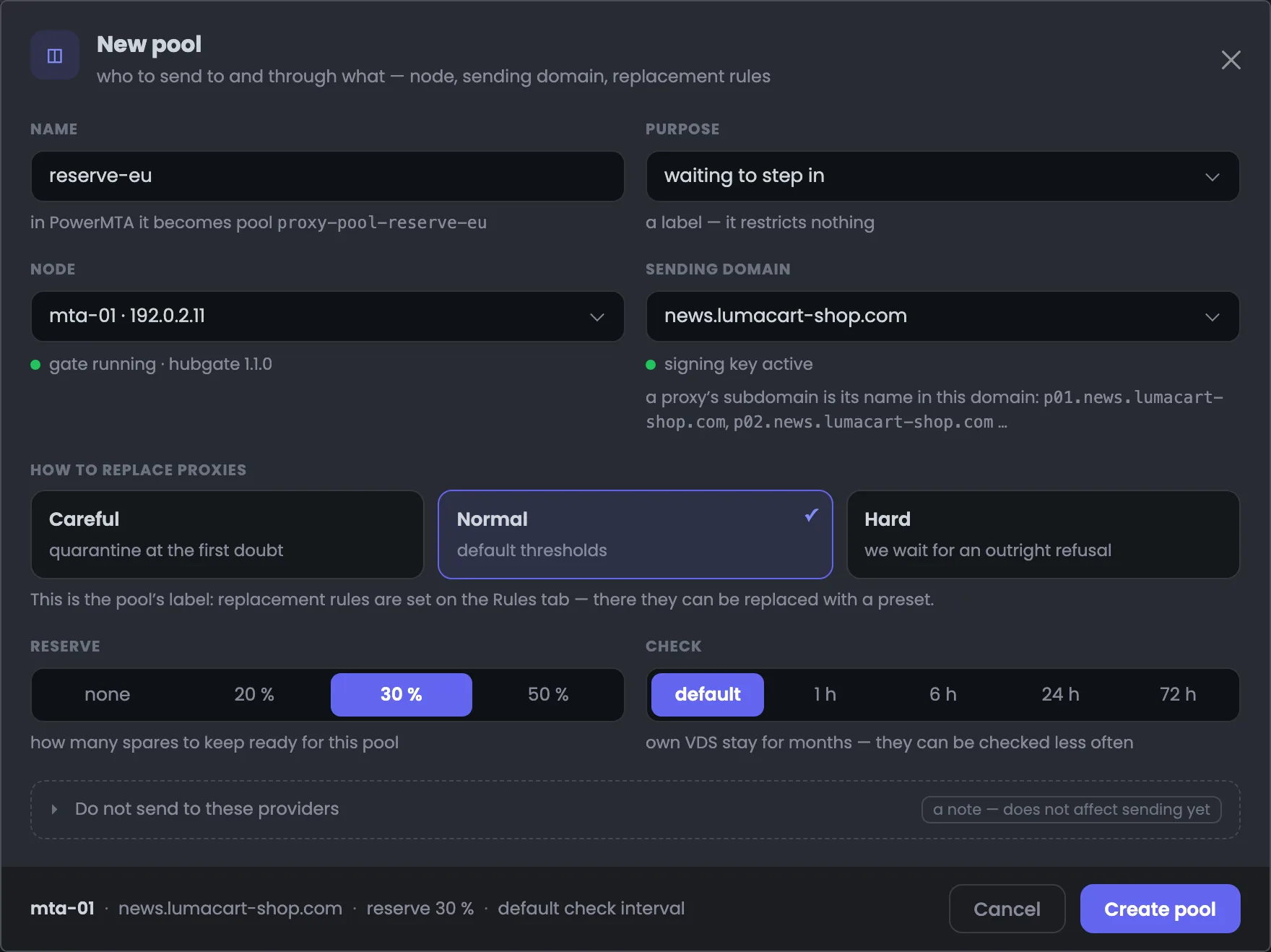 Enlarge
While the pool is empty it sends nothing — you add addresses to it with the “Add proxies” button.
“Add proxies” on the “Sending · marketing” pool opens the proxy list in selection mode. The candidates are addresses fit for mail; if an address is already in another pool, it says right there that adding will take it from there. In the example px-07 and px-08 are ticked — spare addresses of the second pool that the first one lacks. This way you top up the reserve straight from the list and see in advance which pool the addresses are taken from. The address px-06, with port 25 closed, isn’t among the candidates — so an address unfit for mail doesn’t get into the pool, and the panel at the bottom offers “Add to pool ‘Sending · marketing’”.
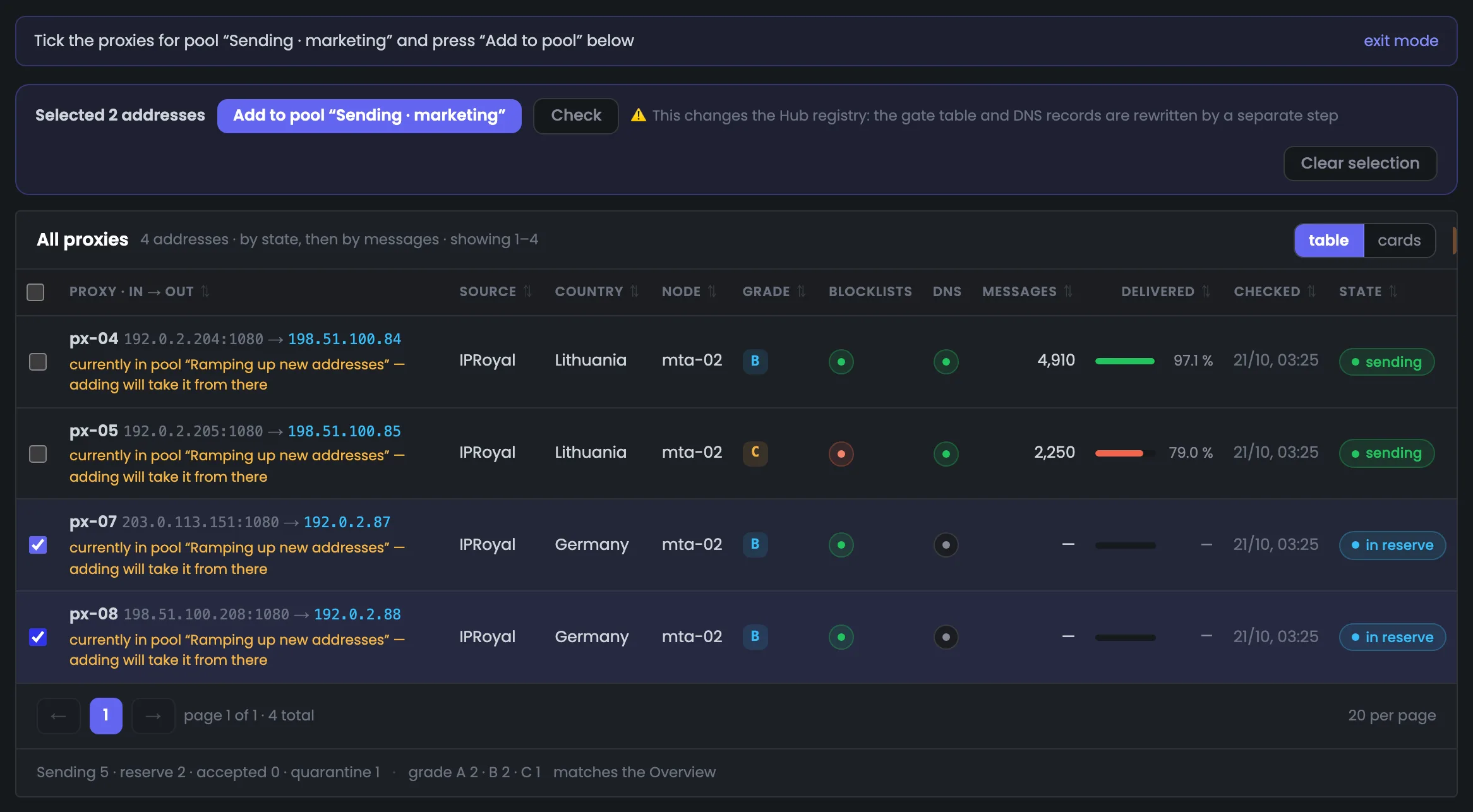 Enlarge
The address px-06, with port 25 closed, isn’t among the candidates: only addresses fit for mail become candidates.
06 / Questions about pools
In short: how a pool relates to addresses, the reserve and rules — and what happens when things change.
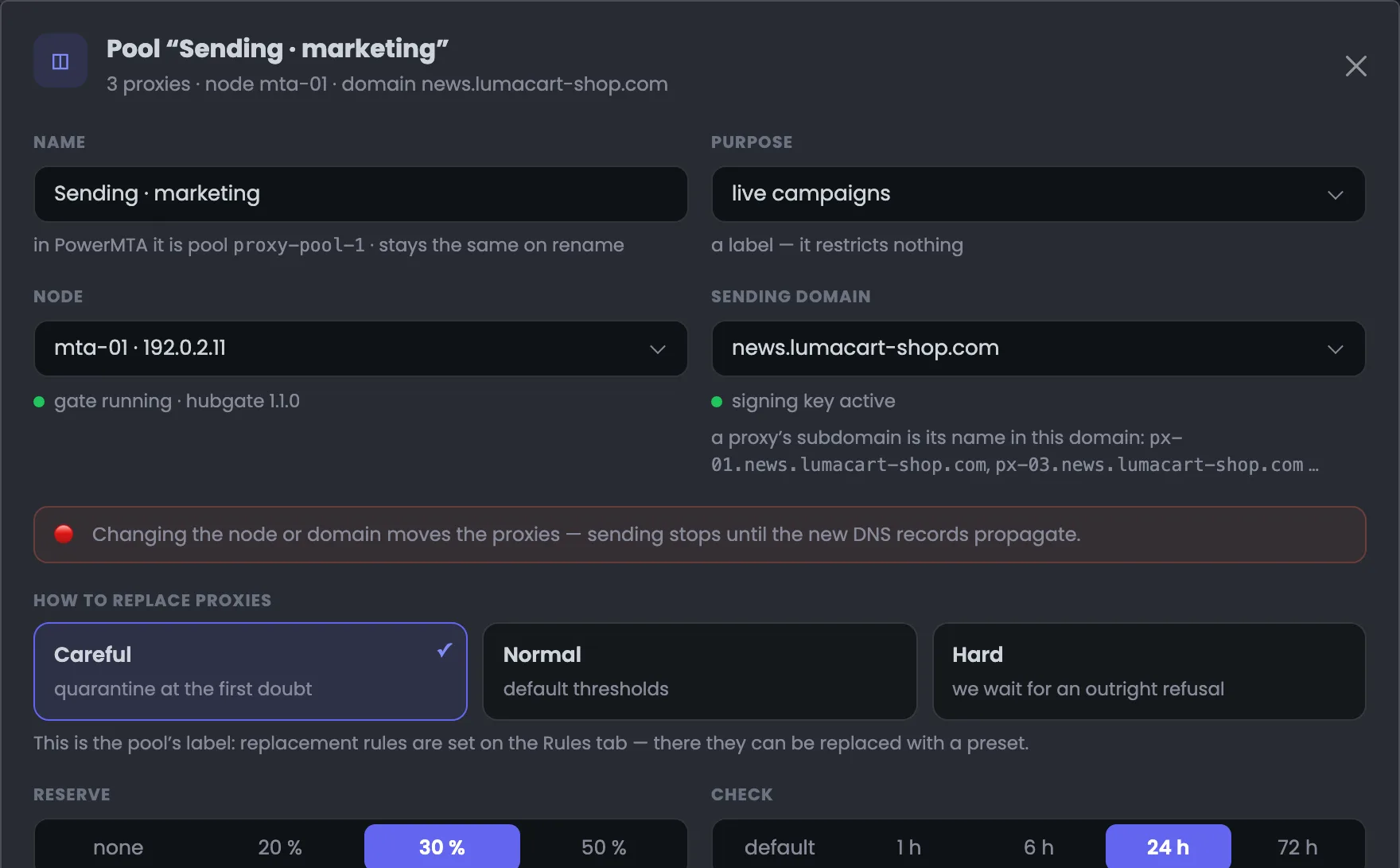 Enlarge
Next to the server — whether the gate is running; next to the domain — the signing key; next to the name — the pool in PowerMTA.
No, a proxy belongs to exactly one pool. If you add an address from another pool, the Hub warns you: adding will take it from there.
They’re the pool’s label — how cautiously to replace addresses. The replacement rules themselves are set on the “Rules” tab. The pool card says how many rules apply and whether they match the preset.
Spare addresses wait in the pool and replace one that fails. If there are fewer spares than the set share, the card warns: the replacement rule will have nothing to swap in for a bad address.
The addresses stay in the Hub. Sending ones are taken out of sending, fit ones get the “accepted” state and wait in the “Outside pools” block.
A subdomain is issued when the address is put into sending. While an address waits in reserve, it has neither a subdomain nor messages — you can see this in the pool’s address table.
As set in the pool: the default, or every 1, 6, 24 or 72 hours. Your own VDS stay up for months — you can check them less often.
It counts messages from the pool’s addresses sent through the pool’s server. What an address sent earlier through another server doesn’t move into the pool with it.
No, the purpose is only a hint. “Live campaigns” or “waiting to step in” help you understand what the pool is for but don’t limit anything.
07 / Next step
A pool says which server and which domain to send from. When and how to replace bad addresses is decided by the pool’s rules — you set them on the “Rules” tab.
Addresses for pools come from the proxy list, and the whole route — from the MTA through the gate to the recipient — is shown in the module overview.